One Command Opens a Whole Session: hermes chat -q Now Stays Interactive on a TTY
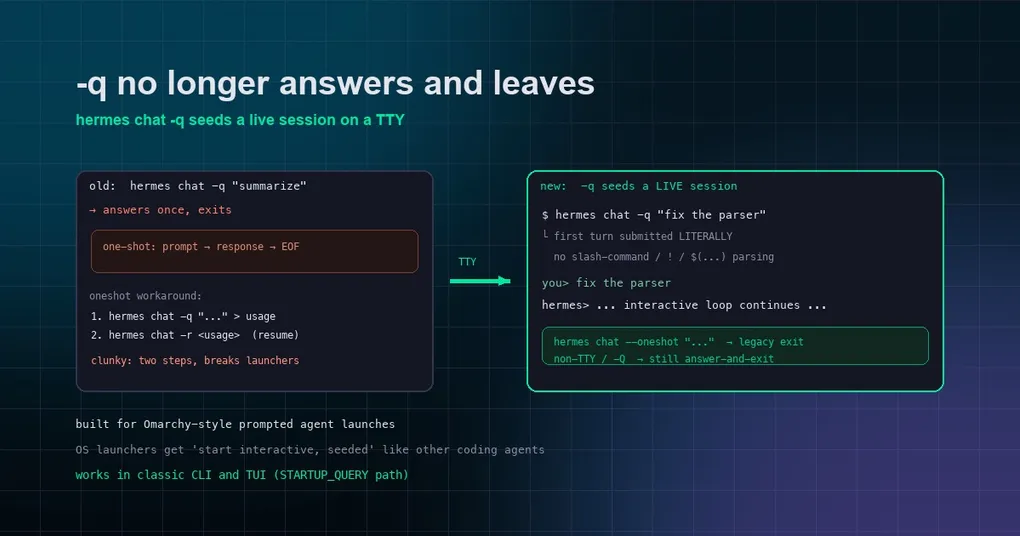
You’re the kind of person who likes Hermes embedded in every launcher: press a hotkey, a terminal pops up with a pre-seeded prompt, hit enter, and the work starts. That path used to be blocked — hermes chat -q "tidy up this directory" dutifully answered one question and exited, and the “keep asking after the answer” part was simply not there. Wanting an interactive session meant running -q once to save the session, then hermes chat -r to resume — two steps, fragile, and often missing context. The change merged on August 28 (PR #97121) tears that old path out: on a real TTY, -q now seeds a live interactive session, the first message goes in literally, the reply doesn’t end the session, and you keep chatting.
Why it was so awkward before
-q/--query was designed as a “one-shot query”: pass a prompt, Hermes answers, exits. That made it perfect for scripts and automation — hermes chat -q "summarize today's commits" prints its output and ends, no terminal occupied.
The cost: to get “enter interactive mode with a pre-seeded question” (an experience other coding agents have had for ages) you had to hand-assemble two steps:
# Step one: run once, capture the session file
hermes chat -q "tidy up this directory" > /tmp/usage.txt
# Step two: resume that session to keep talking
hermes chat -r /tmp/usage.txt
Clunky and brittle: the intermediate usage file is easy to lose, and the resumed session didn’t always carry the context you wanted. Prompt-driven agent-terminal projects like Omarchy were literally about to build a workaround for this (basecamp/omarchy#8705) — then the official CLI got the pattern built in.
New behavior: -q seeds a live session on a TTY
After the change, on a real TTY:
hermes chat -q "fix this bug in the parser"The first message is submitted literally as the session’s opening turn (a _SeededQueryMessage sentinel), and then you drop into the normal interactive loop — keep typing, follow up, use slash commands, exactly as if you’d opened hermes chat.
“Literally” is the key word: the seeded message is never parsed. It won’t be treated as a slash command, won’t trigger ! shell escapes, won’t do $(...) command substitution, won’t be handled as a file drop. It matches --oneshot’s existing semantics: whatever you give the model is what it gets, clean and simple.
Both the classic CLI and the TUI paths support this — the TUI side goes through the STARTUP_QUERY → submitLite submission flow, with identical behavior.
Want the old behavior? --oneshot says so explicitly
If you genuinely want the answer-and-exit one-shot semantics, the new hermes chat --oneshot flag (internal name oneshot_exit) is the official name for the old behavior:
hermes chat --oneshot -q "answer only this one question"Without --oneshot:
- real TTY +
-q→ seeds an interactive session (new behavior); - non-TTY (pipes, scripts) → automatically degrades to answer-and-exit, so automation never hangs;
- with
-Q/--quiet→ answer-and-exit too, quiet mode unaffected.
In other words: scripts and automation are completely unaffected; only when a human sits at a terminal does the behavior change — which is exactly the point of this change.
Typical uses
Launchers / hotkeys: bind hermes chat -q "open yesterday's session and continue what we didn't finish" to a hotkey — the terminal that pops up is already an interactive session ready to work.
Pre-seeded workflows: write a wrapper script that takes a directory argument, builds a prompt, and execs into hermes chat -q "$PROMPT" — the user gets a session that already knows what to do, not a cold blank prompt.
Automation is untouched: cron scripts and CI can keep using hermes chat -q ... | grep ... or -Q exactly as before.
Upgrading and verifying
This change merged on August 28 and currently lives on upstream main — it hasn’t landed in a release tag yet. To use it now you’d build from source or main. Once it ships in the next release, hermes update gets you there.
Easy verification: run hermes chat -q "What is 1+1?" in a terminal. If the prompt stays and you can keep typing after the answer, the new behavior is live; if it exits back to your shell, you’re on an older version.
Further reading
- Want the full command surface of Hermes chat? See our hermes-chat command reference;
- Into session save/resume/export? Read the session export guide;
- Planning automation workflows? Check the cron automation guide.