Lock the skills you wrote by hand: the agent can no longer change them, not even under --yolo
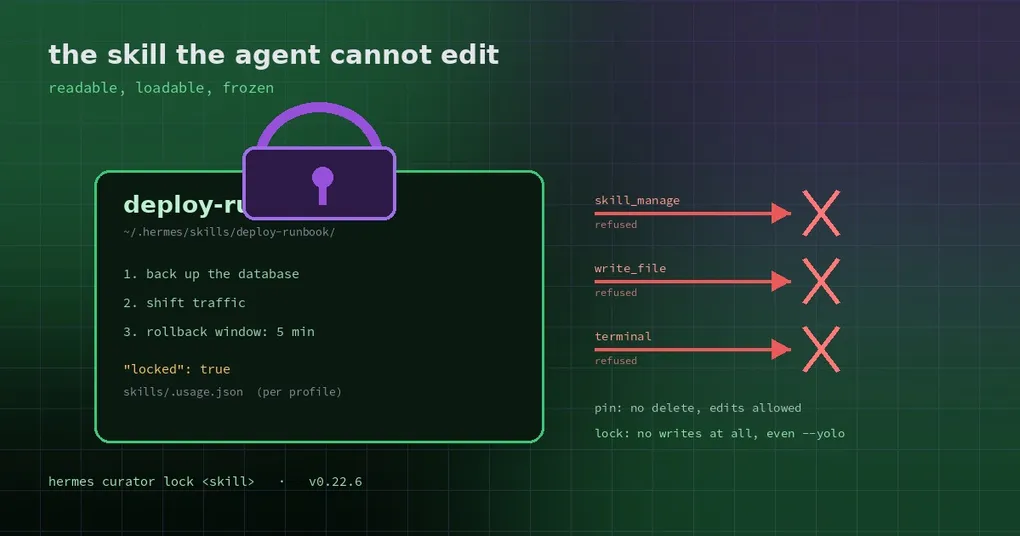
You spend an afternoon writing the deploy runbook your team actually needs: back up first, then cut traffic over, a five-minute rollback window, and a list of which tables must migrate last. It works. Every release, the agent follows it.
Then one day it “improves” itself. The curator decides the skill is too verbose and merges some steps; the self-improvement review adds a “more efficient ordering”. By the time you notice, the backup step has moved to after the cutover — and this release has already shipped.
The problem is not that the agent cannot follow rules. It is that skills you wrote and skills the agent wrote live in the same pool with the same permissions. Hermes has always had pin, but pin only stops deletion and automatic archival — edits and patches still go through. v0.22.6 adds the actual lock.
pin vs lock, in one line each
- pin: the curator will not stale or archive it and the agent cannot delete it; it can still be edited.
- lock: the agent cannot change it at all, while the skill stays readable, listed in the skill index, auto-loadable, and usable exactly as before.
Pin means “do not throw it away”. Lock means “do not touch it”.
How to lock
hermes curator lock <skill>      # lock it
hermes curator unlock <skill>    # lift it
hermes curator status            # list what is locked
In the desktop app you do not need the CLI: open Capabilities → Skills, select the skill and use its lock switch.
The record lives in the active profile’s skills/.usage.json — the same sidecar as pinned — as "locked": true. That makes it per profile:
hermes -p work curator lock deploy-runbook # only the copy in the work profileAlmost anything lockable is lockable: hand-written, agent-created, bundled, or hub-installed, as long as the name resolves in that profile. Conversely, lock refuses a name it cannot resolve, so a typo cannot forge a record.
What the lock actually blocks
For a locked skill, every agent write path is refused — wider than most people expect:
- every mutating action of
skill_manage(create, edit, patch, delete); write_file/patchtargeting any path inside that skill’s directory;- any
terminalcommand that would write there — redirections,tee,cp/mv/rm, in-place editors likesed -i,gitmutations inside the skill tree,cdinto it first, and inline interpreter code that names the path.
Those limits hold under --yolo too, and across normal turns, cron jobs, subagents, the background self-improvement review, and the curator pass itself. The curator will not archive a locked skill either.
One detail deserves its own sentence: the agent cannot unlock it. Its attempt to run hermes curator unlock is refused at the terminal layer, and while any skill is locked, the lock record file is protected the same way. The refusal tells it to describe the change it wanted so you can decide.
Your own edits are not gated at all: your editor, the desktop skill editor, and the CLI all still work. The lock constrains the agent, not you.
What a lock is not
Three boundaries the docs state plainly:
- It constrains the agent only — do not expect it to protect you from your own mistakes.
- It is a policy check, not a sandbox. The terminal guard reads a command’s write targets (redirections,
tee,cp/mv/rm,sed -i, git inside the skill tree,cd, inline code naming the path). A script that writes there through its own logic is not seen. Real isolation still means a container or a restricted terminal backend. - A corrupt
.usage.jsonfails closed on the background paths, not everywhere: the passes that would change skills (self-improvement review, curator) are refused, while normal turns keep working, so one broken file does not freeze every skill edit. Repair the file, or runhermes curator unlock <skill>to rewrite it.
When it is worth using
- Production runbooks, compliance procedures, incident playbooks — anything where one wrong step is expensive.
- A team skill library you maintain: you want the agent to use it, not to “helpfully optimise” it.
- A third-party skill you just reviewed: run it for a while, then decide whether to loosen the lock.
If you do want the agent to iterate on a skill, leave it unlocked and use pin to keep it from being archived.
For the wider trust picture, two more posts pair well: the blind spots in the skill guard covers what the checker itself misses, and skill integrity and supply-chain rug-pulls covers how an installed skill can be swapped underneath you. A lock answers the third question: once it is installed, who is allowed to change it?
The capability ships in the v0.22.6 tag — upgrade and it is available; hermes curator status lists every locked skill by name.