Hermes Desktop first run: a setup chat instead of a settings screen
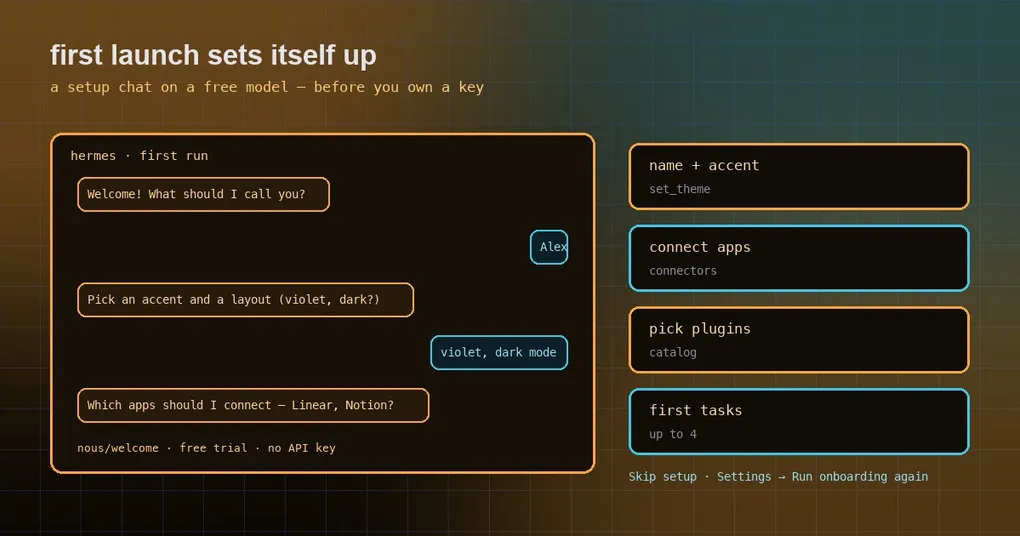
You install Hermes Desktop on a fresh laptop and hand it to a teammate who has never used an agent. Instead of saying hello, they meet a settings screen: pick a provider, paste an API key, choose a model, choose an accent color and a layout, tick which apps to connect, tick which plugins to install. By the fourth decision they have stopped reading. You have been there too — you wanted to try a tool and spent half an hour configuring it first. The old version asked for about ten things before it would say a single word back, and nothing on that screen told a newcomer which of them actually mattered.
That screen is gone in v0.22.0. Open the desktop app on a computer where Hermes was never used, and it starts a short guided setup chat instead: one card at a time, each asking for one thing. Here is what it asks, how the free trial behind it works, and what the new set_theme tool adds.
The first launch is a conversation now
The old first run was a page of settings you had to face all at once. It is now a back-and-forth, one card per question:
- your name;
- an accent color and a layout;
- which apps to connect;
- which plugins to install.
When the cards are done it gives you a quick tour, then offers up to four first tasks picked for you — chosen from the answers you just gave. You do not have to invent your own “now what”; you start from something concrete.
The whole conversation runs on a free trial model, nous/welcome, so a newcomer is talking to Hermes before they own an API key. You are never locked into finishing it either: Skip setup ends it at any point, and Settings → Run onboarding again brings it back whenever you want a second look.
set_theme: change how it looks from any chat
The accent color, light or dark mode and layout you picked during the chat stay editable afterwards, without a trip through settings. This release gives the agent a set_theme tool (source: tools/set_theme_tool.py, and listed in the official tools reference).
It covers exactly three things: the accent color (a preset swatch, or any #rrggbb value), the mode (light, dark or system) and the layout. Called with no arguments it shows a picker instead. Because it is an ordinary chat tool, saying something like “make it violet, dark mode” in any desktop chat does the job — no menu hunting, no separate preferences window.
The free trial: talk first, decide about a key later
nous/welcome is a one-time trial counted once per OS user, and its boundaries are narrow enough to be worth spelling out:
- a first desktop install that has no provider configured and no Nous account is the case that gets the free model;
- the CLI, the TUI and the messaging gateway get no free model and no account;
- the old
HERMES_GUEST_ONBOARDINGenvironment variable is gone.
What the free tier does not do is pretend. There is no path where a limit quietly swallows a request: when the free rate limit is hit, the turn ends immediately and tells you when it resets. Every free-tier failure carries an error code plus a plain sentence explaining what happened, and free-tier users are shown a Terms and Privacy notice, so nobody is left guessing whether they are on a trial or a paid setup.
One thing worth being precise about, because it surprises people: this trial is tied to the desktop app’s first run. It is not a general no-key mode for Hermes. The CLI, the TUI and the messaging gateway do not get the free model or an account, so a script that shells out to hermes on the same machine is not covered by the trial you just accepted in the app.
To turn that trial identity into a real Nous account, one command does it — and your connected apps come along:
# upgrade the one-time free identity into a full Nous account
# (connected apps are kept)
hermes auth upgrade
Inside any chat or a messaging DM, /login does the same thing.
When you will not see this chat
The first-run conversation covers one situation — local, brand new — and it is honest about not travelling further than that:
- Existing installs do not get it again;
- remote backends (SSH, URL, Cloud) do not receive the first-run chat automatically;
- the old setup-profile flow and the
/initiate-setupcommand have been deleted, so an older tutorial that tells you to type it now points at nothing.
Replaying it, and putting it in front of someone else
Nothing about the chat is one-shot. Skip setup closes it wherever you are, and Settings → Run onboarding again brings it back later — handy once you have connected a couple of accounts and want to see the apps and plugins questions again with a better idea of what you are answering. Because the flow belongs to a computer that has never run Hermes, the way to walk a teammate through it is exactly the situation at the top of this post: hand them a machine that has never had the app on it. On a machine you already use, the tour and the suggested first tasks are not part of the path any more, and no amount of clicking around in settings will summon them.
Two smaller offers that follow the cards
Two related first-run moments are worth knowing about, without overselling them. First, if the machine can run the recommended local model, it gets a one-time setup offer to install one. Second, Settings → Providers → Local Models installs and maintains llama.cpp with the engine that matches your hardware (CPU, CUDA, Metal, Vulkan, ROCm), and rates each catalog model against your GPU and RAM so you are not guessing which ones will actually run. On the terminal side, hermes model now includes a Local models entry in the model picker.
If you are setting up plugins rather than a machine, the desktop plugin guide explains what a plugin is allowed to do once it is installed.
Where this shipped
The setup chat, set_theme and the free trial around them arrive in v0.22.0, “The Threshold Release”. The window it rolls up spans v0.21.1 through v0.21.7: roughly 24,200 commits, about 6,080 merged PRs, some 15,600 files changed and around 2,520 contributors. The full v0.22.0 release notes have the rest of it.
To start from a clean install and watch the flow yourself, the install guide covers every platform. If your real question is whether you can get going with no API key at all, the free-tier guide goes deeper, and the local-model offer above is covered in local models and hardware recommendations.