Every Window Minimized, Fan Still Spinning: Hermes Desktop Stops Painting the Unseen
You hit send, then switch to the browser to look something up. The Hermes window sits in the background, streaming its answer character by character. Twenty minutes later you close the lid, unplug and leave. When you come back the battery has dropped further than it should, and the fan was clearly busy while you were away.
A hidden window should not work like that. Nobody is looking at it, yet it was repainting every character at foreground speed.
The old behaviour: one conversation streaming, every window awake
In the previous implementation, the state “a conversation is streaming” kept every desktop window fully awake: the paint loop kept running, and preview pages were held awake too, so automation and annotation capture would always be ready.
With one window it was invisible. With several windows, long-running turns and a laptop battery, it was a constant background cost.
The preview half was subtler: even a completely idle page never entered Chromium’s background throttling, because annotation or automation might need it at any moment.
Now: painting follows visibility
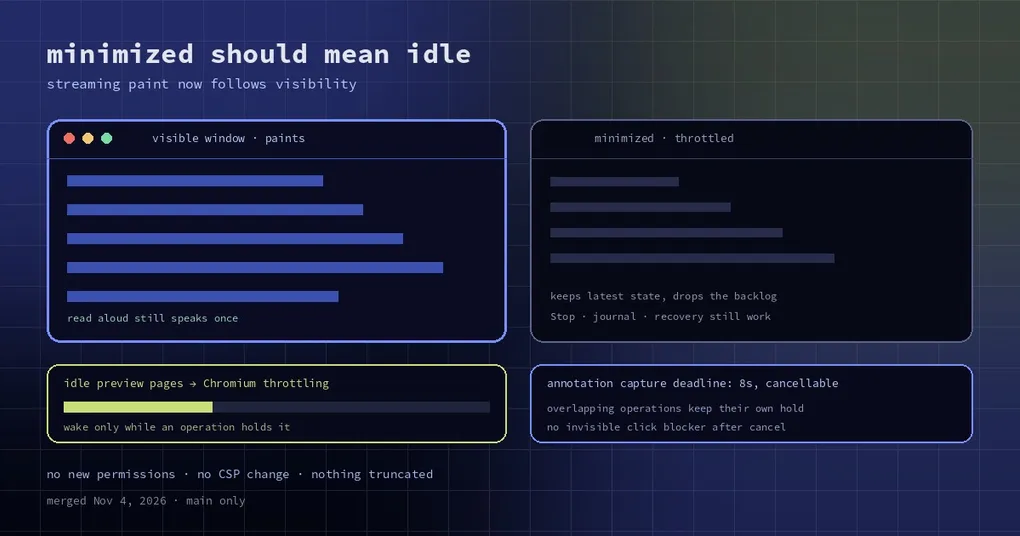
Streaming paint is scoped to two windows: the visible ones, and the one window that has its own live voice conversation (that one stays awake even hidden, because the voice needs it). Everything else — minimized peers included — is allowed to throttle.
Note what this is not: “Read replies aloud” no longer buys every window a wake exemption. It used to imply each window had to stay awake to speak its content; now minimized peers stay throttled and completed progress plus the final reply still speak exactly once.
At the same time, the things that must not depend on drawing were decoupled from animation frames: stream delivery, Stop, turn journaling and crash recovery all work without them. Restoring a window shows the latest state instead of replaying a backlog of paints.
Partial-text updates are coalesced. Completed progress and final replies are published without waiting for the next frame — which is why a hidden window can still read aloud, once. When two windows have replies at the same time they share ownership of the pending turn, so narration is neither lost nor spoken twice.
Preview pages: idle means idle
The second change is about the built-in preview: an idle page is now allowed to use Chromium’s own background throttling instead of holding a wake for itself.
The guest page and its owning window are woken only for real work, and the wake is held per operation. Overlapping operations each keep their own hold, so finishing one cannot suspend another. After navigation the wake is re-applied even when an existing operation has not dispatched another script yet.
Several sharp edges were closed at the same time:
- Work abandoned by a committed navigation is cancelled, while script return values, plugin consent, trusted input, sandboxing and CSP all stay intact.
- Annotation paint waits and image capture share one cancellable eight-second deadline. Waiting for the user’s next annotation holds nothing awake.
- Queued annotation installs and teardown are fenced by session, so a cancellation cannot leave an invisible click blocker behind or remove a replacement overlay.
- Plugin scripts keep their existing completion semantics: their wake hold lasts until settlement or cancellation, even for a promise that never settles. Plugin scripts and long typing actions do not inherit the capture deadline.
No new dependencies, permissions or CSP changes, and nothing was truncated in the transcript or scrollback.
How to see it for yourself
The acceptance path is deliberately manual:
- Open the same conversation in two windows, minimize one, stream a long reply. Type in the visible window, then restore the other — both should show the complete reply.
- Press Stop in the visible window. The cancelled output must not resume when you restore the peer.
- Turn on “Read replies aloud” in both windows: minimized peers stay throttled, yet completed progress and the final reply are still spoken once.
- Start a voice conversation in only one window: streaming in the peer must not interrupt its capture or playback.
- Reload during streaming: recovery keeps the latest text, including the quiet tail after the provider stops sending.
When you will actually notice
Three situations: a laptop left watching a long-running task, anyone who keeps the same conversation open in two or three windows to compare, and people who read documentation in the built-in preview while annotating it.
It will not make your model faster or your replies shorter. It just lets windows nobody is looking at go quiet.
Can you use it today?
Both changes merged into main on November 4, after the v0.22.7 release point — so as of this writing they are not in a release; the v0.22.7 post covers what did ship. Desktop typing latency has its own analysis, and if what you actually care about is being told when something needs you, the attention and notifications guide is the receiving end.