Watching a Loop: the Live Countdown That Just Landed on CLI, TUI and Desktop
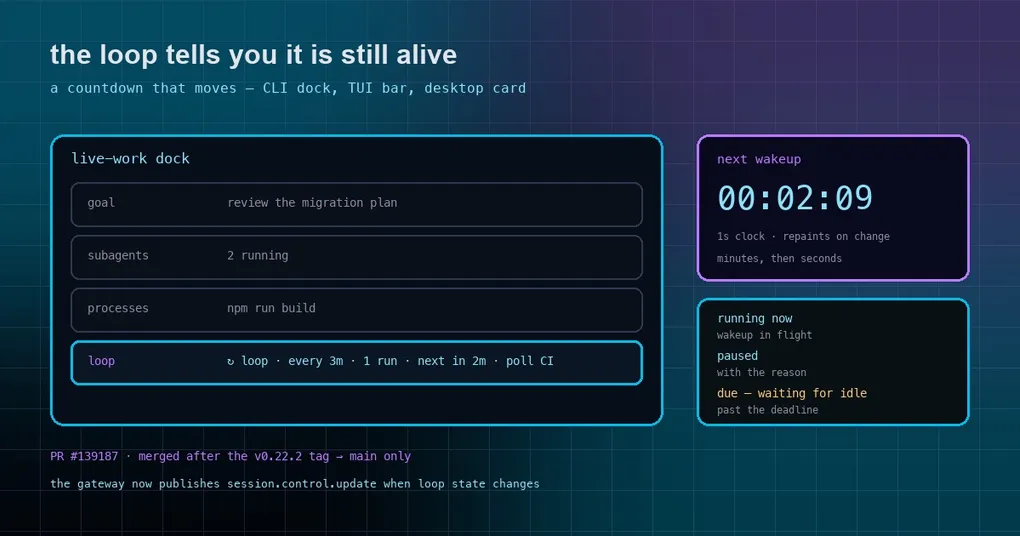
You set a loop to watch a deploy every three minutes and then went back to work. Ten minutes later you glance at the terminal and it still says the same thing it said when you started — next in 3m — so you ask yourself the question every loop user eventually asks: is this thing alive, or did it quietly stop? That ambiguity is what a merged PR on October 15 set out to remove, and it did it on all three surfaces at once.
What a standing loop is, in one paragraph
/loop re-runs a prompt inside your current session on a cadence you choose, or on a cadence it picks for itself:
/loop 5m check the deploy status and tell me if it's live yetEach wakeup is an ordinary agent turn, so it reads current state — the newest CI result, the queue depth, the file as it is now — rather than replaying a summary. It runs on the CLI, the TUI, the dashboard chat, the desktop app and every gateway platform, and it lives in that session: stop conditions are LOOP_COMPLETE from the agent, --times N, --until <condition>, loops.max_ticks as a backstop budget (100 by default), or you, with /loop stop and /loop pause.
The problem: a countdown painted once
The old behaviour was a single transcript line — ↻ Loop: next in 3m. — printed when the loop was accepted. It never moved. On the desktop app it was worse in a subtler way: the loop card’s next ~45m was computed once per render, so the number was frozen at whatever it happened to be when the card first drew. The information you needed (how long until the next wakeup, is it running right now, is it paused) existed in the session, but nothing repainted it.
What the three surfaces show now
CLI. The live-work dock — the panel that already tracks goals, subagents, processes and the queue — gains a loop row:
↻ loop · every 3m · 1 run · next in 2m · <prompt>The countdown steps per minute and switches to seconds in the last minute, so an idle prompt repaints at most once a minute instead of once a second. During a wakeup it reads running now, and when the loop is paused it shows the pause reason. Collapse the dock and the heading carries a compact badge — ↻ loop next in 2m — so you still get the answer without expanding anything. With the dock visible, the old static ↻ Loop: next in 3m. transcript line is dropped, because keeping both was just duplicated noise.
TUI. hermes --tui gets a LoopBar sitting under the GoalBar, with the same text, driven by the session snapshot and a one-second clock that only repaints when the label actually changes.
Desktop. The loop card now shares the heartbeat’s one-second countdown clock — next 00:02:09 — and once the deadline has passed it says due — waiting for idle instead of showing a number that has gone negative. That last string is shared with the heartbeat card, which is why it was renamed to a common key rather than duplicated.
The part you would not notice: the gateway had to publish it
A countdown on the CLI is straightforward — that process owns its terminal. The Ink bars in the TUI and the card in the desktop app are different: they read a session snapshot that the gateway publishes as session.control.update. And that update was only being published when someone clicked a button on a desktop card. Type /loop 3m … in a chat and the state never reached the surfaces that were supposed to render it.
The fix moves publication to the places where loop state actually changes: the owner publishes after an automation slash command, after a local session’s post-turn goal and loop hooks, and after a loop wakeup fires or a slash tick settles. The legacy tui_gateway path gets the same two publishes so older clients see wakeups too.
That is the interesting lesson in this PR: adding a display to a live value is rarely only a display change. If the value is published by someone else, the fix includes convincing them to publish at the right moments — otherwise you ship a progress bar that is honest only about the first frame.
How to tell whether you have it
The change merged on October 15 at 15:34 UTC, and v0.22.2 had already been published that morning, so this is on main only for now — work that is main-only ships with v0.23.0. Practical check:
hermes versionIf you are on a release build, the dock will keep showing the old static line. If you need loop visibility today and cannot run main, the workable substitute is /loop status, which reports cadence, ticks fired and time to the next wakeup on demand — one keystroke instead of a glance, but it does answer “is it alive”.
Two related details are worth knowing before you rely on a countdown: a wakeup is a normal user-role turn, and token cost scales with cadence, so a one-minute loop that has nothing to do still costs a turn a minute — prefer self-pacing when you are waiting on something that changes on its own schedule. And for work that must survive your terminal closing, this is the wrong tool: an unattended schedule belongs in a cron job, while /loop is for monitoring inside a session you are already in.
Also worth knowing
loops.min_interval_seconds(30),loops.self_paced_floor_seconds(60) andloops.self_paced_ceiling_seconds(900) are the knobs behind the cadence;loops.max_ticks(100,0for unlimited) is the backstop.- An active
/goalowns the session: while a goal is being driven by its judge, loop wakeups defer and resume when the goal finishes, pauses or parks on a wait barrier. - One loop per session — setting a new
/loopreplaces the old one; several loops means several sessions (or cron). - On the desktop and dashboard, a session with an active loop is exempt from the disconnected-session reaper, so wakeups keep firing after you close the window — as long as the backend process itself is still running.
- Ctrl+C on a wakeup turn pauses the loop rather than destroying it;
/loop resumepicks it back up.
If /loop itself is new to you, the loop command guide covers the basics that this countdown sits on top of.
Sources: PR #139187 (/loop shows a live countdown to the next wakeup on CLI, TUI and Desktop, merged October 15, 2026) and its validation table; website/docs/user-guide/features/loops.md on main for the commands, cadence modes, configuration keys and the /loop vs /goal vs cron comparison.