Plugins never touch your token again
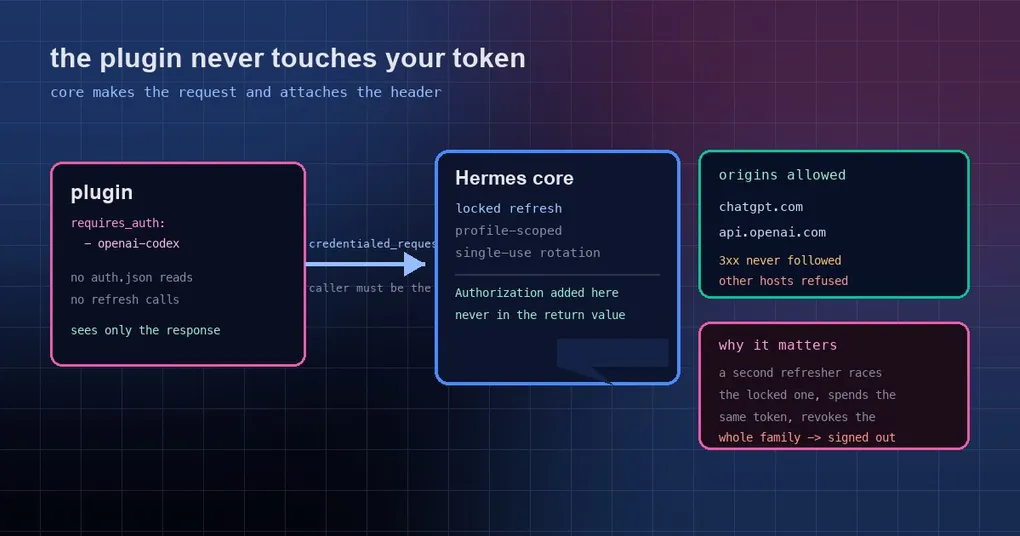
You install a voice plugin. It needs your ChatGPT sign-in to mint a realtime session secret. Everything works for a few days. Then one morning Codex has signed you out. You sign in again, and the next day it happens again. You blame the network, the browser, maybe your account — anything but the plugin, which after all only “used” your login. What actually happened: the plugin and Hermes both wanted to refresh the same credential, and Codex refresh tokens are single-use. Whoever spends it second is holding a dead token, and the whole token family gets revoked with it.
That is not a malicious plugin. It is the natural path for a plugin that needs a sign-in, and the official docs name the same voice plugin as the example. PR #136117 (merged into main on October 10, 2026 and shipped in v0.21.7) took a third option: let the core make the request. The plugin no longer reads, refreshes or writes the credential at all — it only receives the response.
How the failure happens: one single-use token, two spenders
The mechanics are worth spelling out, because the responsibility is unambiguous once you see them:
- Codex refresh tokens are invalidated by use, so refreshing has to be serialized. Hermes has known this for a while and refreshes under a lock — the rule set covering this class of provider is
_SINGLE_USE_REFRESH_PROVIDERS. - A plugin that needs the ChatGPT sign-in previously tended to vendor its own little reader for
~/.codex/auth.json: if the token looked close to expiry, POST toauth.openai.com/oauth/tokenwith the Codex CLI client id, then write the new tokens back. - Those two refresh implementations do not share a lock. When they refresh at the same time, the same refresh token is spent twice. The server treats that as abuse and invalidates the entire token family.
The result is the symptom that costs hours to diagnose: nothing in your config changed, nobody mistyped a password, and you are simply signed out. And it comes back after you sign in again, because the plugin’s second refresher is still there.
The new shape: the core makes the request
The new public module hermes_cli/plugin_provider_requests.py offers credentialed_provider_request(). It is deliberately plain — an importable function in the same shape as hermes_cli.urllib_security.open_credentialed_url — so it works from register(ctx) code and from dashboard plugins (dashboard/plugin_api.py) alike.
Two steps for a plugin author. First, declare the sign-in in plugin.yaml:
name: live-voice
requires_auth:
  - openai-codex
Then hand the request to the core and stop touching the credential file:
from hermes_cli.plugin_provider_requests import ProviderNotSignedIn, credentialed_provider_request

def mint_client_secret(session: dict) -> dict:
    try:
        resp = credentialed_provider_request(
            "openai-codex", "POST", "https://api.openai.com/v1/realtime/client_secrets",
            json={"session": session}, timeout=15)
    except ProviderNotSignedIn as exc:
        return {"ok": False, "error": str(exc)}  # the message names the sign-in command
    if resp.status != 200:
        return {"ok": False, "error": f"client secret failed ({resp.status}): {resp.text[:300]}"}
    return {"ok": True, **resp.json()}
What comes back is a ProviderResponse (status, headers, body, plus .text and .json()) — with no token in it. The code to delete is your hand-rolled reader and refresher: from the plugin’s side, the refresh step no longer exists.
Four hard rules
This is not a general-purpose proxy. It carries four boundaries, each answering a real incident:
- Declared plugins only. The caller is identified as the plugin directory found on the call stack; the core reads that plugin’s
plugin.yaml. A plugin that does not list the provider underrequires_auth— or code that belongs to no installed plugin — gets aPermissionError. Handing the bare helper torun_in_executordoes not help either: there is no plugin frame on the stack, so the call is refused. Call it from your own function. - Fixed origins only. For
openai-codex, the token is sent only tohttps://chatgpt.comandhttps://api.openai.com. Any other URL is refused before any network I/O. A profile whose Codex credential routes to a custom gateway is refused too — that key belongs to the gateway, not to this path. - No redirects.
follow_redirects=False. A 3xx response comes back unchanged, so an Authorization header can never be walked to a third host. - Profile-scoped credentials. It resolves through
resolve_codex_runtime_credentials(), the same locked-refresh, profile-scoped, pool-aware path chat uses. With no sign-in you getProviderNotSignedIn, whose message names the command the user needs (hermes auth add openai-codex, or the Codex sign-in inside the desktop app).
What it changes for the person installing plugins
A good part of the value here is visibility at install time:
requires_authappears in the install prompt and inhermes plugins show <name>.- More usefully, it participates in the consent flow when a catalog pin is updated. If the new version adds tools, hooks, Python dependencies, host capabilities, a provider sign-in (
requires_auth) or a Desktop UI half that the installed version did not have, the CLI shows the delta and asks y/N before anything moves; the Desktop and dashboard update buttons show the same confirmation. Declining — or a non-interactive session with nobody to answer — leaves the plugin at its old pin.
In other words, “this plugin quietly widened its own access” is now a question the update path asks out loud.
What it is not: this is not a sandbox
The official docs are blunt about this, and it deserves to be repeated verbatim to users: this is consent and visibility, not a sandbox. Plugin code runs in-process, so it can still read any file you can read. The review process rejects plugins that do, but that is a review constraint, not kernel-level enforcement.
The only hard guarantees are the four rules above: attribution, origin, redirects and the credential resolution path. Read it as “a plugin can no longer pretend to be the core when using your sign-in”, not as “the plugin has been contained.”
Usage panels and sign-out go through the core too
Two traps the docs close off explicitly:
- Do not call usage endpoints yourself. Use
agent.account_usage.fetch_account_usage("openai-codex", read_only=True). It returns a snapshot (plan, session and weekly windows withused_percentandreset_at) and never refreshes or rotates a credential. - Sign-out belongs to Hermes, not to a plugin. Point users at
hermes auth logout openai-codexinstead of deleting credential files — deleting them is how this whole story started.
What to do now
- Plugin authors: if your plugin reads
auth.jsonor refreshes a Codex token itself, delete that code, callcredentialed_provider_request()instead, and addrequires_authtoplugin.yaml. Everyone running it stops being signed out by that race. - Everyone else: the capability is in v0.21.7 (tagged October 11). To see whether an installed plugin has adopted it,
hermes plugins show <name>prints the declaredrequires_auth. For the surrounding security model, see our plugin catalog guide and the catalog’s CI supply-chain write-up.
The short version
- “Plugins should not hold your token” is not fastidiousness; it is the conclusion of a concrete bug: a single-use refresh token spent by two refreshers, and a user signed out with no idea why.
- The fix was not to hand plugins a smaller key. It was to take the key away: the core makes the request and attaches Authorization, and the plugin sees only the response.
- The four rules — declare it, fixed origins, no redirects, profile-scoped credentials — move this from convention to mechanism.
- Visibility matters as much:
requires_authshows up at install, on inspection, and in the update confirmation, so a plugin can no longer add a sign-in quietly. - And keep the boundary in mind: consent and visibility, not a sandbox.