One command to update every plugin: hermes plugins update now shows you the list first
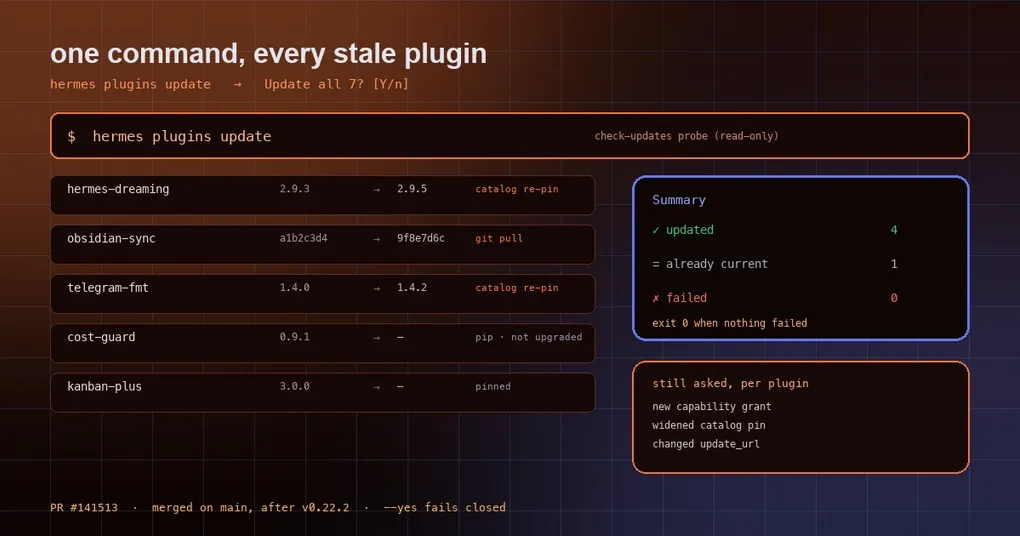
Back from a week off, you run hermes plugins list and find twelve plugins installed, seven of them flagged as having an update. You remember two of those shipped bug fixes. So you start typing names — hermes plugins update foo, then bar — and somewhere around the fourth one you lose track of which are left, give up, and tell yourself you will deal with it later.
That is the kind of chore that never breaks anything but keeps costing you. A change merged on October 19 fixes it: hermes plugins update now works without a plugin name — audit first, update once.
Why it used to demand a name
The update subcommand did exactly one thing: take a name, look up how that plugin was installed, and pull the newer version. It had no idea what else was installed, so with no name it could only print a usage error:
$ hermes plugins update
usage: hermes plugins update [-h] name
hermes plugins update: error: the following arguments are required: name
Bulk updating meant writing your own loop, and the loop is easy to write badly. Is the directory name actually the plugin name? Catalog installs and Git installs update differently — do you branch on that? If one fails, do you keep going? All of that judgement used to live in your head.
Now: no name means “audit them all”
hermes plugins updateIn a terminal it runs a read-only check-updates probe and prints a table:
| # | Plugin | Current | Latest | Update |
|---|---|---|---|---|
| 1 | hermes-dreaming | 2.9.3 | 2.9.5 | catalog re-pin |
| 2 | obsidian-sync | a1b2c3d4 | 9f8e7d6c | git pull |
Under the table it names every plugin it skips and why — for example skipped foo (pip): pip distribution; Hermes does not upgrade it. Then it asks once:
Update all 2? [Y/n]:Enter or y and it updates each one. Each plugin still goes through the full single-plugin path — this is not a force-push. If a new version asks for new capabilities (a new tool, new filesystem access), that prompt still appears per plugin; if the catalog re-points a release commit, that still asks too. The point of batching is to remove repeated typing, not to remove informed consent.
One failure does not stop the rest
The worst batch behaviour is “the third plugin failed, so the last four never ran”. Here each plugin is independent:
- A failure prints that plugin’s own error line and moves on;
- The run ends with a summary split into
✓ updated,= already currentand✗ failed(with the first line of the failure reason); - Exit code is 1 if anything failed, 0 if everything succeeded;
- With nothing to do it says
No plugin updates to apply.and exits 0.
That makes it safe to put behind a shell conditional or in a scheduled job:
hermes plugins update --yes || echo "some plugin failed to update"Running it in scripts, cron and pipes
With no terminal (cron, CI, a pipe into tee) the default is do nothing: it prints the list, exits 1, and tells you to re-run with --yes. That conservatism is deliberate — bulk upgrades should never quietly change things in an unattended environment.
With --yes, the updates actually run, but consent fails closed:
- New capabilities requested by a new version are not granted; the plugin stays restricted;
- A re-pinned catalog commit is not applied;
- Everything that needs no extra consent updates normally.
--yes is also only valid without a name. hermes plugins update foo --yes is refused, so nobody reads it as “upgrade this one and auto-approve whatever it asks”.
If you genuinely want unattended updates for some plugins, that is a separate, explicit switch:
plugins:
  auto_apply: true    # tracked Git installs only; default false
auto_apply covers tracked Git plugins only. It does not touch pinned, manually placed, provenance-drifted or pip-distribution rows. Both routes run the same pre-update security scan.
Which plugins get skipped, and why
Bulk update only acts on the two kinds update can actually move: catalog installs (re-pinned to the reviewed catalog commit) and tracked Git installs (pulled). Everything else is skipped by name instead of being silently “updated”:
| Case | Skip reason |
|---|---|
| pip distribution | Hermes does not upgrade PyPI packages — that is pip’s job |
| pinned (version or commit) | Pinned means you want it to stay put |
| needs fixing | Fix the install state first |
| status unknown | Cannot reach the remote, so it will not guess |
If you git cloned a plugin straight into the plugin directory, it is not a tracked install — run hermes plugins adopt <name> first so Hermes knows where it came from. That is intentional: it will not pull a directory whose provenance it does not understand.
One more safety detail: if a new version changes its manifest, or introduces or replaces an update_url, Hermes refuses the new address until you approve it:
hermes plugins trust-update-url my-pluginThat is a feed-provenance check, not a sandbox. It defends against “the update channel was swapped for someone else’s server”; it does not defend against code you already trust doing something bad.
When checks happen, and how to check
hermes plugins update runs the same probe as hermes plugins check-updates, which is read-only and leaves plugin files untouched — good for monitoring:
hermes plugins check-updates # report only, changes nothingThe gateway also runs a scheduled check, spaced by plugins.auto_update_check_hours (default 24 hours, 0 disables it). Its receipt is visible through hermes pm status and the Desktop sync-status view. That only controls how often Hermes looks — nothing updates by default unless you run update or opt into auto_apply.
Practical advice
- Look before you leap. If you are unsure how far behind you are, run
hermes plugins check-updatesfirst; it touches nothing. - Run
hermes plugins listafterwards. Bulk update still prompts per plugin. If you hammered Enter through an authorization prompt, that plugin ends up restricted rather than broken, and nothing screams at you — worth a glance. - Do not rely on defaults in CI. Without a terminal it declines to update and exits 1; if your pipeline treats non-zero as failure, pass
--yesexplicitly or keep upgrades out of CI. - “New version” means different things per install kind. A catalog install moves to a commit the catalog reviewed; a Git install follows the upstream branch HEAD. The second has a much larger blast radius.
Two earlier posts give the background: how the plugin catalog works and the CI supply-chain gate behind it. If you maintain portable plugins, the MCP trust gate for portable plugins covers the other half of the trust story. The full subcommand list lives in the plugins command reference.
The short version
Bulk upgrading is not the hard part — keeping “bulk” and “informed consent” together is. This change draws the line clearly: repeated typing goes away, and every decision that matters (new capabilities, a re-pinned catalog commit, a changed update source) still lands in front of you one at a time. For anyone running a dozen plugins, that is the difference between “I will get to it” and a weekly one-liner.