Your Connection Looks Alive, But Nobody's Home: How Hermes Heartbeats Heal Silent Disconnects
You close your laptop, go grab lunch, and come back. Hermes is still sitting there on screen — session history, cursor, everything looks normal. You type a message and hit enter. Nothing happens. No error, no spinner, no timeout. Just silence. Your message vanished into a black hole.
That “interface alive, connection dead” situation is called a silent disconnect. It’s not a Hermes-specific quirk — it’s a disease of every networked program: the network is gone, but neither end knows it, so one side waits and the other side waits too. A set of changes merged into Hermes recently lets the TUI and Desktop detect these zombie connections and rebuild them on their own. Here’s what they actually fixed, and why it matters to anyone who runs Hermes remotely.
Why connections “fake their own death”
First, the basics: your Hermes interface (the terminal TUI or the Desktop app) talks to the actual “brain” — the gateway process running on a server or in your machine’s background — over a single WebSocket connection. Every message you send and every token it replies with travels over that pipe.
The problem is the network underneath. Say your Mac sleeps for ten minutes, the Wi-Fi drops in between, and it wakes up with a new IP. Or you switch from office Wi-Fi to your phone’s hotspot. Or your VPN reconnects. In all of these cases the old TCP connection no longer exists — but your machine doesn’t know that. The jargon is half-open connection: one end of the pipe has vanished, and the other end still believes everything is fine.
Why can’t either side notice? TCP does have a keepalive mechanism, but by default it pokes the wire far too rarely to matter, and browsers don’t even expose ping/pong to WebSocket developers. So the client keeps writing to a dead connection — writes that don’t fail loudly, they just silently go nowhere. That’s your message entering the black hole.
The fix: a three-layer heartbeat
PR #93792, merged on August 24 (integrating three contributions from community developer @100yenadmin — #89958, #90012, #89984), tackles exactly this: every client connection now pings the gateway on a schedule, declares the connection dead when no answer comes back, and rebuilds it automatically. It works in three layers, each solving one problem.
Layer 1: the server learns to answer pings
The server side (tui_gateway/ws.py) does three small things. First, its startup handshake (gateway.ready) now advertises heartbeat: true, telling clients “I support heartbeats.” Second, it adds a gateway.ping method that is answered inline on the read loop — no queueing, no scheduling, answer on receipt. Third, it stamps every connection with last_inbound_at (when the last data arrived), which makes diagnostics easier later.
Layer 2: the client pings on a schedule and declares death on timeout
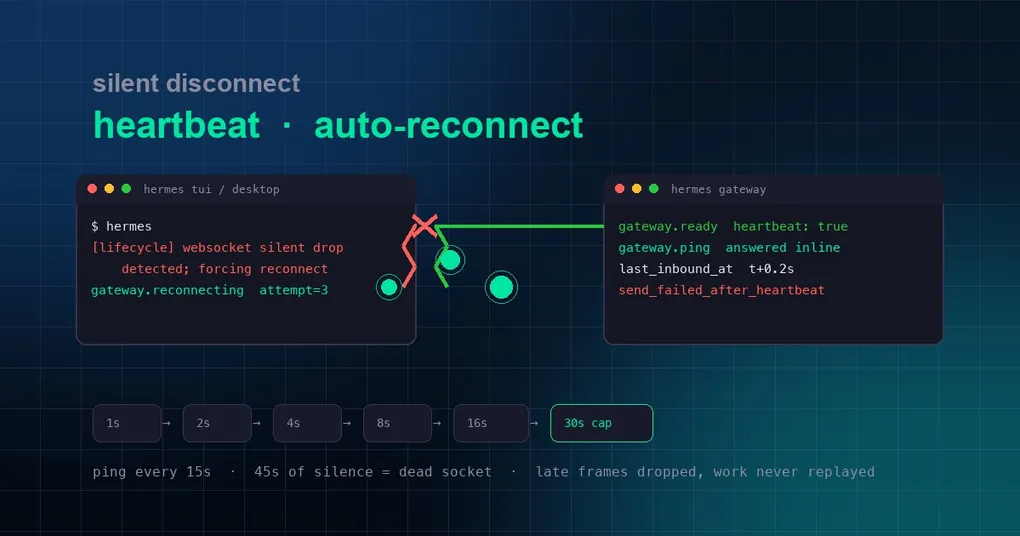
The TUI client (ui-tui/src/gatewayClient.ts) and the Desktop’s shared JsonRpcGatewayClient use the same parameters: send a gateway.ping every 15 seconds; if no data at all arrives from the gateway within 45 seconds (not just heartbeat acks — any data counts), declare the connection dead and tear it down for a reconnect.
Why 45 seconds and not 15? Network round-trips have latency, and a single lost heartbeat doesn’t mean the connection is gone. If you haven’t heard anything in 45 seconds (three heartbeat cycles), that’s almost certainly not jitter — the connection is really gone.
Layer 3: exponential backoff, and stale data gets thrown away
Once a connection is declared dead, the client doesn’t hammer the server with reconnect attempts. It uses exponential backoff: retry after 1 second, then 2, then 4, 8, 16… capped at 30 seconds, and keep retrying until it connects. Every attempt publishes a gateway.reconnecting event (attempt number + delay in milliseconds), which makes troubleshooting easy.
The Desktop adds a finer mechanism: socket generation invalidation. When a connection is rebuilt, the client hands the new socket a fresh generation token; any late frames arriving on the old socket — for example, the last messages the gateway emitted just before the drop — are discarded because they carry the old token. The new connection starts clean, so leftover traffic from a dead socket can’t pollute the new session, and no work gets replayed twice.
Older gateways are unaffected
The whole heartbeat is capability-gated: clients only start heartbeating after receiving heartbeat: true in the gateway.ready handshake. If you’re still connected to an older gateway — say a remote server that hasn’t been upgraded — the client behaves exactly as before. That means this fix can ride along with new clients without breaking old servers.
Which scenarios are covered
- Sleep/wake: macOS and Windows sleep cycles rebuild the network stack — the most common source of zombie connections. Previously the Desktop only ran a one-shot probe on wake (that was #93694, merged earlier the same day, which stopped remote-gateway updates from stranding the app on a dead socket). Now there’s a continuous heartbeat underneath.
- Network switches: Wi-Fi to hotspot, Ethernet unplug/replug, office roaming.
- VPN reconnects: when the tunnel rebuilds, all the old connection’s TCP packets are lost.
- Silent server restarts: the gateway process restarts but the client never gets a close notice.
The server also enabled TCP keepalive on WebSocket sockets (dead-peer detection) as a second line of defense.
When you’ll actually get this
To be honest about the state: these changes live on main only — they have not shipped in any tagged release yet (the latest, v0.20.5, was tagged on August 19, before this batch landed). So if you run hermes update today, you won’t see heartbeat logs yet. Upgrade when the next version lands — our install and upgrade guide shows how, and you can browse the v0.20.5 release notes to see what the previous release changed.
How do you confirm the heartbeat is working after upgrading? Watch for [lifecycle] lines in the TUI: in normal operation they stay quiet; when the network hiccups, you’ll see websocket silent drop detected; forcing reconnect and scheduling gateway reconnect in Xms. That’s no longer bad news — it’s the client saving itself.
And if your concern is the other kind of stall — the agent’s reasoning loop getting stuck (not a connection problem, but the agent itself stopping work) — that’s a separate mechanism: the gateway-side loop watchdog, which we covered in the loop-watchdog tuning guide. Read the two together and you’ve covered reliability on both the transport layer and the execution layer.
Summary
Silent disconnects are the invisible killer of remote tooling: no error, no hint, just your confused stare. Hermes’ fix is refreshingly simple in spirit — ping on a schedule, reconnect when nobody answers, and back off politely while doing it — but that simplicity is exactly why it works. It turns “the connection faked its death” from folklore into a detectable, recoverable event. Next time your network hiccups, stop staring at the black hole: the client is already working on a way back.