Your Terminal Finally Shows the Picture: Inline Images in the Hermes CLI and TUI
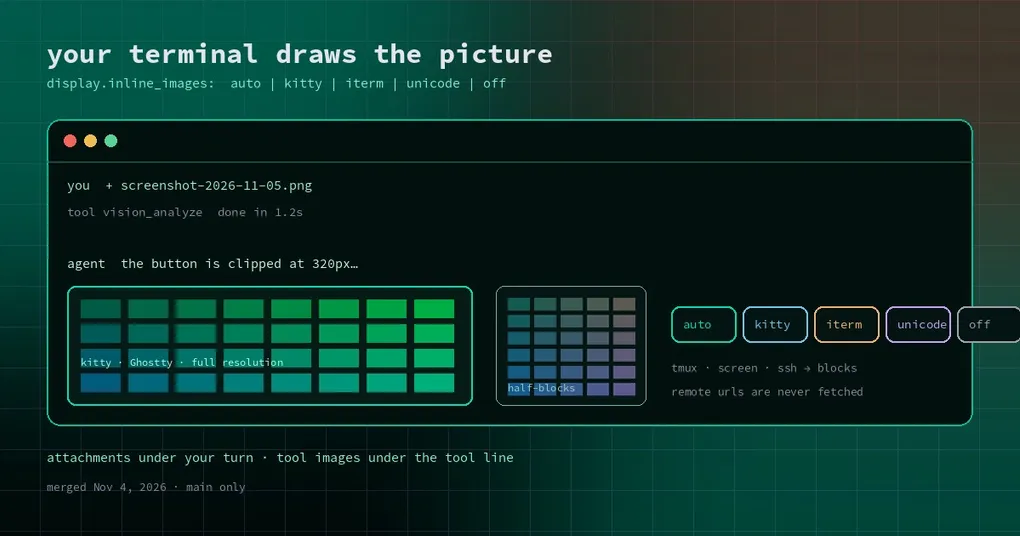
You ask Hermes to look at the page you just screenshotted, and it answers “the button on the right is clipped.” You want to point back at it and check, so you look up — and there is no picture on screen. Just a path: /tmp/screenshot-2026-11-05.png. Open the file manager, double-click, wait for the viewer, switch back to the terminal. Two round trips later, your train of thought is gone.
That loop is now closed. A change merged on November 4 makes Hermes draw images directly in the classic CLI and in the TUI: the images you attach appear under your message, and images a tool produced appear under that tool’s line.
It used to be a path; now it is the picture
Two cases are covered:
- Images you attach — via
/paste,/image, or by dragging a file into the terminal — are drawn under your message row. - Local images a tool produced or looked at — a
vision_analyzeinput, animage_generateresult, a browser or computer-use screenshot — are drawn under that tool’s line.
Two things deliberately do not appear, and knowing them saves you a support hunt: read_file cannot read images, so it draws nothing; and remote image URLs are never fetched — only local files are rendered.
One setting, five tiers
It lives in config.yaml under display, and defaults to auto:
display:
  inline_images: auto   # auto | kitty | iterm | unicode | off
What each tier means:
autodraws full-resolution images in kitty and Ghostty (kitty graphics protocol with Unicode placeholders) in both the CLI and the TUI, and in the classic CLI it also uses the iTerm2 inline-image protocol to draw over reserved rows in iTerm2, WezTerm and Konsole. Everything else — tmux, GNU screen, SSH sessions into VS Code, and the TUI anywhere outside kitty/Ghostty — gets truecolor half-blocks: two half-height characters per coloured pixel cell.kittyforces the kitty protocol. The usual reason is the classic CLI inside tmux withset -g allow-passthrough on.itermforces the iTerm2 protocol in the classic CLI; the TUI falls back toautoat this tier.unicodealways uses half-blocks.offshows file paths only, exactly as before.
A table is faster to scan:
| Terminal | What auto gives you |
|---|---|
| kitty / Ghostty | full resolution (CLI and TUI) |
| iTerm2 / WezTerm / Konsole | full resolution (classic CLI only) |
| VS Code terminal (image support on) | full resolution (classic CLI only) |
| tmux / GNU screen / SSH into VS Code | truecolor half-blocks |
| anything else, sixel terminals included | truecolor half-blocks |
VS Code gets asked once, at startup
VS Code’s integrated terminal can show real images, but only when terminal.integrated.enableImages is on. Hermes had no way to know, so it always played it safe with blocks.
Now the classic CLI probes VS Code exactly once per launch: it sends an XTSMGRAPHICS query fenced by DA1, in the window before prompt_toolkit takes over the tty. Only VS Code’s image addon answers that query, so a reply means images are on. The answer is cached; the probe is skipped over Remote-SSH, on Windows, and when there is no tty. If images turn out to be off, roughly one launch in five Hermes swaps its random tip for a one-liner naming the setting — not every launch.
Why so many terminals only get coloured blocks
The reason is mechanical. A renderer that lays out line by line can reliably measure two image forms: kitty’s Unicode placeholders, where the picture occupies grid cells and the row count is known, and truecolor half-blocks, where two characters make one pixel cell. The iTerm2 protocol paints over a number of reserved rows that nothing counted, which is why it appears in the classic CLI and not in the TUI.
The same constraint explains tmux and GNU screen landing on half-blocks: they may swallow or rewrite passthrough graphics escapes unless you explicitly allow passthrough and pin the kitty tier.
What happens when you resize
The CLI redraws its transcript when the terminal size changes. kitty images and half-blocks come back in that redraw. Images drawn with the iTerm2 protocol leave blank rows in the redrawn screen and stay visible only in the scrollback above it. That is a protocol difference, not a broken feature — worth knowing before you file a bug.
Which images get drawn, and which stay quiet
The tool-image path only looks at named fields: image_url, url, path, image_path, screenshot_path, reading the result before the arguments. So a search_files listing full of PNG paths will not turn your terminal into a photo album.
Oversized PNG previews are refused before anything decodes them — a deliberate boundary so one huge image cannot stall the terminal.
Drawing is local rendering. The image was going to the model anyway as an attachment or a tool result; this layer adds pixels to your screen, not tokens to the request.
Can you use it today?
The work merged into main on November 4, after the v0.22.7 release point (November 3), so it is not in a release yet — as of this writing it lives on main only. Run from source if you want it now, or wait for the next version.
If you care about the other half of the picture — how an image is understood and what it costs in context — the image context budget post and the image vision routing guide cover that. This change is about seeing it. If you live in the keyboard, the command palette guide is the neighbouring read, and a fresh install starts at the install page.