Command Not Found in the Agent's Terminal: How Hermes Fixed a PATH Reset by Login Shells
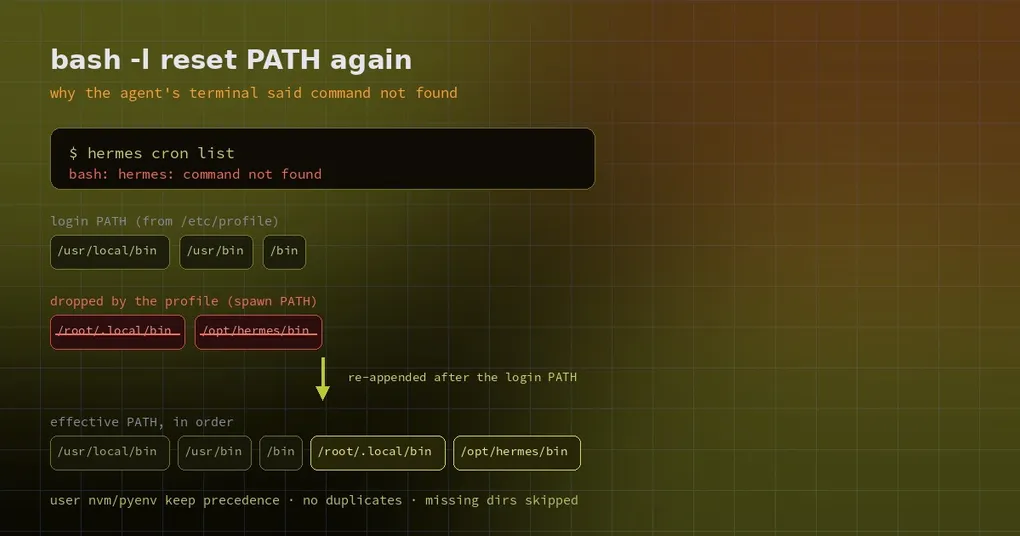
You ask the agent to run hermes cron list in its terminal so it can see why a scheduled job never fired. It answers with one line: bash: hermes: command not found. You open your own SSH window, type the same thing, and it works. Back in the session, command -v node comes back empty too — even though you installed node with nvm.
It is not a permissions problem and Hermes is not broken. Something reset PATH, quietly and completely.
Who reset PATH
Behind the terminal tool there is a bash. So that the nvm, asdf and pyenv setups you rely on also work for the agent, Hermes starts a login shell once when it creates the session and captures the resulting environment — sourcing ~/.profile, ~/.bash_profile and ~/.bashrc is exactly how those version managers add themselves to PATH. That part is intentional and useful.
The problem is Debian and Ubuntu’s /etc/profile: it does not extend PATH, it rewrites it to a fixed list (typically /usr/local/bin:/usr/bin:/bin plus a few games directories). Once the login shell finishes, the captured snapshot pins that reset PATH. Everything Hermes had at startup is gone: ~/.local/bin, /opt/hermes/bin, /opt/hermes/.venv/bin, and every nvm shim directory.
In the Docker image the symptom is loudest: step into a container with bash -l, or docker exec … bash -l, and bare hermes exits 127. Background commands are hit the same way, because they run through bash -lic.
The fix: re-append what the profile dropped
The repair does not overwrite what the login shell decided. It reconciles the two:
- after the login profile runs, any directory from the launch environment that is now missing gets appended, in its original relative order;
- directories already present are never duplicated;
- only absolute entries are checked for existence — a relative entry resolves against the shell’s working directory, so checking it from Python would be meaningless;
- missing directories are skipped instead of being stuffed into PATH as dead weight.
Appending at the end is the important choice. Whatever your nvm or pyenv init decided stays exactly where it was, so a command that resolved before still resolves to the same binary; only commands that had no match at all gain one.
Background commands (process_registry’s spawn_local, bash -lic) prepend the same restore snippet, so foreground and background cannot disagree about which python or hermes exists.
The Docker image adds a second layer: /etc/profile.d/hermes.sh is installed in the image, so every login shell re-adds the three image directories — leaving any that are already listed where they are.
# /etc/profile.d/hermes.sh (inside the image)
for __hermes_p in /opt/data/.local/bin /opt/hermes/.venv/bin /opt/hermes/bin; do
    case ":$PATH:" in
        *":$__hermes_p:"*) ;;
        *) PATH="$__hermes_p:$PATH" ;;
    esac
done
unset __hermes_p
export PATH
Check what PATH really is
Three lines inside the agent’s terminal show you the whole story:
echo $PATH                 # what the agent actually gets
command -v hermes          # empty means not found
bash -lc 'echo $PATH'      # the login shell's reset PATH, for comparison
Symptom-to-cause table:
| Symptom | Real cause | What to do |
|---|---|---|
hermes: command not found inside Docker |
Login shell reset PATH; image lacks the profile.d patch | Upgrade the image or the Hermes build |
node / python missing though installed on the host |
/etc/profile clobbered the nvm/pyenv init from ~/.profile |
Fixed automatically in the new build; on older builds list the init files explicitly |
| Only background commands fail | Older build did not share the restore snippet with the background path | Upgrade, or use foreground commands for now |
| Your own script cannot find a tool | The script relied on a directory only an interactive shell has | Use absolute paths, or add the file to shell_init_files |
If you have custom environment files — an internal toolchain, say — tell Hermes exactly what to source instead of hoping it guesses:
terminal:
  auto_source_bashrc: true      # default; an explicit shell_init_files list takes over
  shell_init_files:
    - ~/.profile
    - ~/.config/hermes/env.sh
Boundaries worth knowing
- Only directories that were present in the environment Hermes was launched with get restored. Anything your parent process never had is not invented.
- If you deliberately removed a directory from PATH inside your profile, but it was still in the launch PATH, it comes back. That is the intended trade-off: keep working commands working.
- Windows is unaffected — the native PATH is semicolon-joined and bash sees a converted copy.
- Order is precedence. Because restored entries land at the end, system directories still come before your custom ones; do not “fix” PATH problems by putting a writable directory at the front.
For a broader environment check, run hermes doctor. Terminal scratch-space behaviour is covered in terminal temp directories, container layouts in shared container mode, and swapping the shell out entirely in terminal backend plugins.
Release status
The fix merged into main on 29 October 2026 (PR #146080). The current release, v0.22.5 (23 October 2026), does not include it, so older builds can still hit command not found.
PATH bugs are unpleasant precisely because they never raise an error — a few directories just go missing. At least now they come back where they belong.