No More 5-Minute Approval Stalls for Unattended Hermes: The New approvals.unattended_mode Key
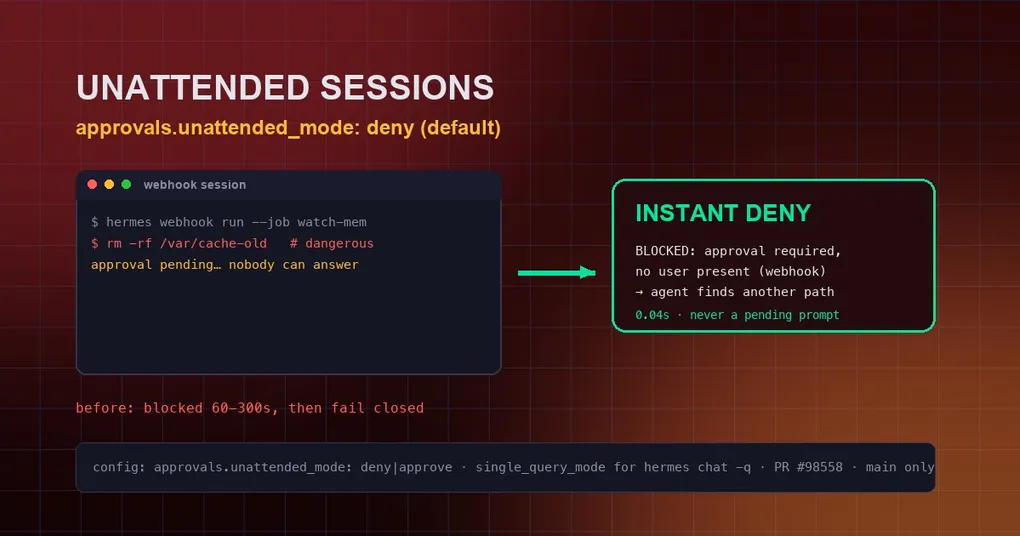
At 3 a.m., your memory-watchdog webhook job hits a “dangerous command” — and then stalls for a full 300 seconds, because the approval prompt goes out to nobody who can answer it. Worse, that wedged session held up a later hermes update gateway drain for over five minutes. That’s the incident (issue #37284) behind a fix merged on August 30 (PR #98558): Hermes gains an approvals.unattended_mode config key, default deny, so sessions on unattended programmatic platforms (webhook, msgraph_webhook, api_server) fail instantly on a dangerous command instead of waiting out an approval nobody can approve. The change currently lives on main, not yet in a release.
The problem: approvals sent to someone who doesn’t exist
Hermes’ approval system intercepts dangerous commands (think rm -rf, DROP DATABASE) and raises a /approve prompt waiting for a human. That works fine on chat platforms — someone is at the screen. But webhook, msgraph_webhook, and api_server bind HERMES_SESSION_PLATFORM the same way chat gateways do, so the approval logic mistook them for interactive gateway sessions — except these adapters have no channel to send an approval or receive a reply at all. Result: the session blocked 60-300 seconds and then failed closed anyway. Time wasted, and nobody ever had a chance to say yes.
The fix: unattended_mode, deny by default
The fix centers on a new config key that mirrors the existing cron_mode semantics:
approvals:
  mode: smart              # smart | manual | off
  timeout: 300
  cron_mode: deny          # cron jobs hitting a dangerous command: deny | approve
  single_query_mode: deny  # hermes chat -q one-shot sessions: deny | approve
unattended_mode: deny # webhook/API unattended sessions: deny | approve (new)deny(default): an unattended session that hits a dangerous command is denied instantly (measured 0.04s) with an actionable message — “this session runs on an unattended platform (webhook) with no user present to approve it; find an alternative approach that avoids this action; to allow flagged actions setapprovals.unattended_mode: approvein config.yaml”.approve: explicitly opts into auto-approving all dangerous commands on unattended platforms (the old behavior from PR #37317, now opt-in instead of default).
The change covers all three guard paths: _run_approval_gate (regular commands), check_all_command_guards (tirith security checks), and check_execute_code_guard (the execute_code tool) — which also closes the #87509 hole where api_server execute_code triggered a one-shot gateway approval nobody could answer.
How to configure it
Stick with the default (recommended): nothing to do, it takes effect after upgrading. To allow a specific unattended scenario (say, a fully trusted private webhook):
# Via the CLI (equivalent to editing config.yaml)
hermes config set approvals.unattended_mode approve
# Or edit ~/.hermes/config.yaml directly
approvals:
unattended_mode: approveBonus: the same fix also landed single_query_mode — hermes chat -q "..." sessions, which run one turn and exit with no user waiting to answer prompts, used to stall the same way and now default to instant deny. For the full approval-policy picture, see our Smart Approvals setup guide and approval-fatigue guide.
What this means for your automation
If you run automation over webhook or API, the effect is: failure changes from “5-minute timeout” to “instant denial with a clear reason”. The agent gets the denial immediately and can try another path instead of hanging. One behavioral note: the old implicit “dangerous commands get auto-approved in these sessions” behavior is gone — if you relied on it, set approvals.unattended_mode: approve explicitly. Cron-side approval strategy is covered in our cron automation guide, and webhook setup in the business notifications guide.
When you can use it
PR #98558 merged on August 30 and is not in v0.20.6 (tagged August 27). Pull latest main to try it now, or wait for the next release. If you’ve ever had a webhook job silently stuck on an approval, this one is worth upgrading for.