hermes update stopped the gateways and never woke them: the .git that git itself rejects
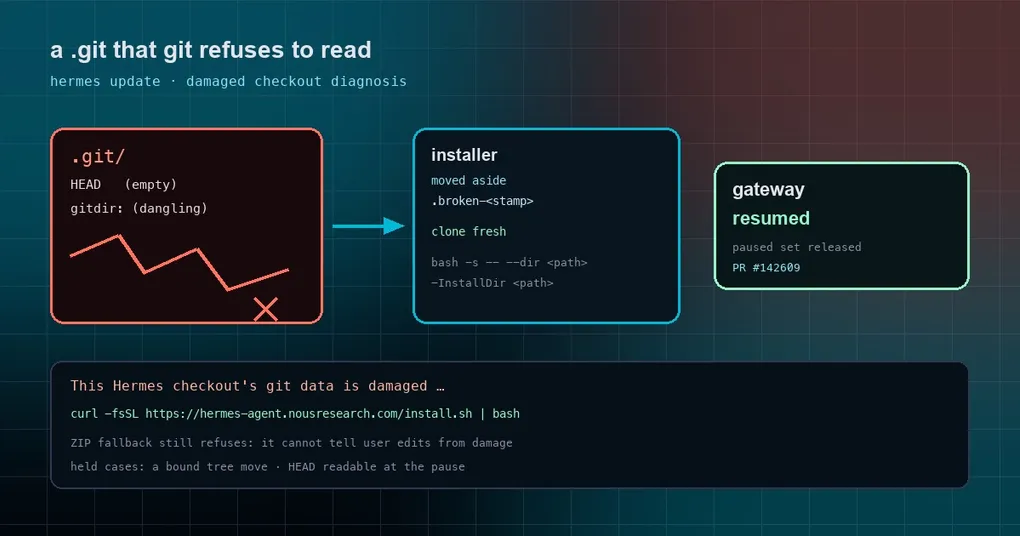
On a Windows box, hermes update finished and Telegram and WhatsApp stopped answering. Three lines in the log: your gateway named hermes-2 was “paused”, then git’s fatal: not a git repository, then a reassurance — “Paused gateway(s) left stopped: the checkout HEAD is unreadable”, with the promise that the next hermes command would bring the gateway back.
You ran one. Nothing came back. You ran hermes update again: same three lines, word for word.
PR #142609, merged on October 21, 2026, fixes that loop. It is worth reading because the bug is not “a feature stopped working” — it is error handling sealing off the recovery path. That class of bug stays invisible until it bites, and when it bites you assume you broke something.
Root cause: a .git that git itself rejects
The premise first: this .git is not missing, it is present and unreadable by git. Two typical shapes:
.git/HEADis empty, or the HEAD file is gone entirely..gitis a file (not a directory) containinggitdir: <some path>, and that path no longer exists — a common leftover of a worktree or a migration.
Hermes’ updater only fetches when .git exists, so it happily fetches against this .git. Git answers not a git repository, the update fails. So far, ordinary.
The real problem is the pause record. Before updating, Hermes pauses running gateways (so nothing is reading the tree while code moves) and records the tree’s state. That record has a check named tree_is_whole, and whenever HEAD is unreadable it held the paused set indefinitely. Which meant:
- First update: pause the gateway, fetch fails, HEAD unreadable, paused set held, gateway stays down.
- Second update: same unreadable HEAD, set held again, gateway still down.
- Forever.
A broken precondition (HEAD unreadable) was treated as a reason not to recover — and it would never fix itself.
Fix one: the pause record lets go
The new rule: if every pause in the set already found HEAD unreadable when it was recorded, and no step bound a tree move afterwards, the set resumes and the gateways come back.
The reasoning is simple. The gateways were serving exactly that tree, and nothing wrote to it — with no half-written state to protect, there is no reason to keep holding on.
Two cases still hold the set, and this matters if you assume it now releases unconditionally:
- a bound tree move is recorded (
_checkout_moverecords targets and paths before git writes anything); - HEAD was readable at the pause and is not now — something else damaged the tree in between, and a human should look.
Fix two: the error names the damage and the repair
The second change is in fetch diagnosis. Previously every cause produced Failed to fetch updates from origin., leaving you to guess.
Now, when git itself prints fatal: not a git repository and the checkout fails rev-parse --show-toplevel, Hermes prints:
This Hermes checkout's git data is damaged ...followed by an installer command pointed at this checkout — with the path:
curl -fsSL https://hermes-agent.nousresearch.com/install.sh | bash -s -- --dir <path>On the PowerShell side it is -InstallDir <path>. That matters for custom-directory installs: they get repaired in place instead of being pushed back to the default location.
Why the extra rev-parse check? Because a remote repository with a dangling .git prints the same fatal: not a git repository line. Matching on the text alone would misdiagnose a local breakage, so the verdict depends on whether the current checkout can be parsed at all. hermes update --check reports the same diagnosis.
Fix three: the installer handles a dangling .git file
Both installers already knew how to move a checkout whose HEAD is unreadable aside as .broken-<stamp> and clone fresh. But install.sh only did that for a .git directory; given a dangling .git file it refused with “not a Hermes git checkout”.
It now tests with -e, matching install.ps1’s Test-Path. Both warnings also say “damaged .git” now, instead of only “interrupted clone” — the two used to look identical.
Why the ZIP fallback still refuses
The updater has a ZIP fallback for when git is unusable: download an archive and overwrite. In this scenario it still refuses.
The reason is in the docs: without git status, it cannot tell your local edits from damage, and overwriting would delete someone’s work. That fail-closed rule (#87304) stands — better a manual repair than a guessed overwrite.
If you are stuck on this right now
If you are staring at a stopped gateway, work through it in this order (all behavior of shipped commands):
# 1. see what the gateway thinks it is doing
hermes gateway list
hermes gateway status

# 2. if it is merely paused and nothing else holds it, bring it back
hermes gateway restart

# 3. if .git really is damaged, repair in place with the installer
#    (replace <path> with your checkout path)
curl -fsSL https://hermes-agent.nousresearch.com/install.sh | bash -s -- --dir <path>
Once you are on a build that carries this fix, step 3 stops being your job — hermes update prints the command for you. It also retires a related misconception: the promise that “the next hermes command will restart the gateways” was not always true, because it depended on the pause record releasing itself, and the old code would never do that.
Release status and blast radius
The PR merged late on October 21, after that day’s v0.22.4 publish (18:49 UTC), so it is not in v0.22.4 and not in any tag — main only for now.
The field reports are Windows (.git/HEAD deleted while the working tree stayed), but the root cause is platform-neutral: anything that makes HEAD unreadable — hand-cleaning .git, an interrupted clone, a migration that copied only the worktree — triggers the same path on Linux and macOS. Windows simply produces that state more easily, through file locks and permission oddities.
The lesson is small and general: when the recovery logic depends on a precondition healing itself, and that precondition is the broken thing, the system stalls silently. Now it either recovers, or tells you exactly where to repair.