Two logins in the same second, two identical keys: inside the Hermes webapp session-isolation bug
A colleague needs to borrow your laptop. You open the Hermes workspace in the browser, hit sign out, watch the login form appear, and slide the machine across the desk. As far as you are concerned, that is settled.
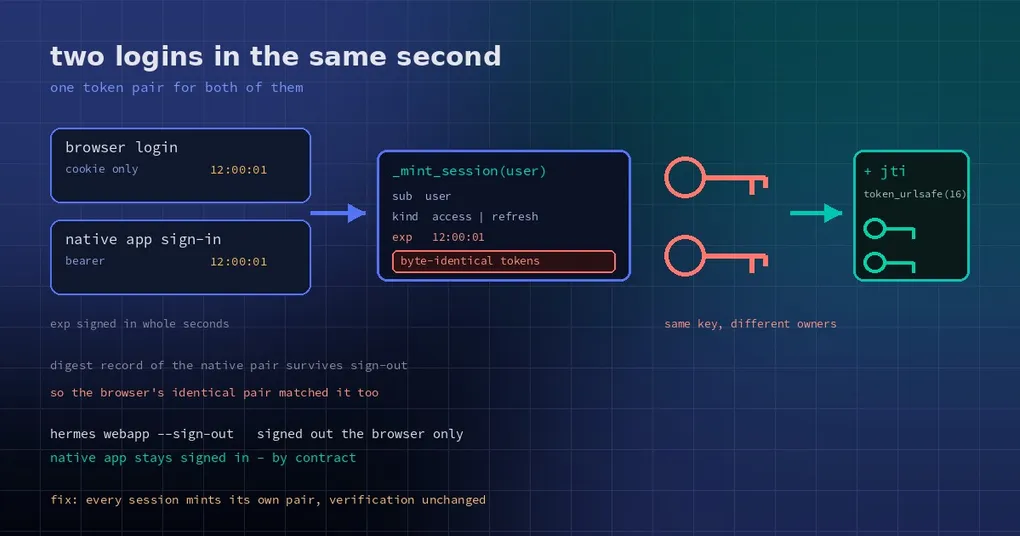
It was not. A fix merged on October 26 (PR #145108) explains the hole: if another sign-in path happens to complete in the same second as your browser login, both sessions are handed byte-identical tokens. The sign-out removed the browser’s cookie; the same key kept working somewhere else — including after a restart.
How this sign-in actually works
The Hermes webapp sits behind a sign-in gate: any browser has to authenticate first. It uses the dashboard account system, and the built-in password provider mints two tokens per login —
- an access token, short-lived, proving who is making this request;
- a refresh token, longer-lived, exchanged for new access tokens.
Both are signed strings carrying three facts: sub (who you are), kind (access or refresh) and exp (when it expires). The server verifies the signature and does not need a database lookup per request.
The design is fine. The problem was in what gets signed. Those three fields were the whole payload, and exp has second granularity. Two sessions minted for the same user within one second therefore produced exactly the same signing input — and so, exactly the same token bytes.
Why a collision mattered
Identical tokens would be a curiosity if the sessions were unrelated. But the webapp has an explicit contract: native apps that signed in on the webapp listener stay signed in across hermes webapp --sign-out; only browsers are signed out. That is deliberate — signing out in a browser should not kick your desktop app offline.
To honour it, the listener records digests of the token pair it gave a native app in webapp/native-sign-in-tokens.json, and deliberately keeps that record across sign-out — which is why the desktop app survives a restart without a fresh login.
That is where the loop closes. If a browser login and a native sign-in land in the same second, their tokens are identical → the browser’s tokens also match that “native app” record → you sign out, the browser cookie is dropped, but the same string still works as a bearer token, and its refresh token still renews at /auth/native/refresh. The test states the outcome plainly: it works before the sign-out, after it, and after a restart.
Put simply: that sign-out took effect in the foreground and not in the background.
Five lines, but aimed at the root
The change is in _mint_session in plugins/dashboard_auth/basic/__init__.py: every minted session gets a random jti (JWT ID, the standard field for numbering an individual token), signed into both the access and the refresh token.
jti = secrets.token_urlsafe(16)
_sign({"sub": user, "kind": "access",  "exp": exp, "jti": jti}, secret)
_sign({"sub": user, "kind": "refresh", "exp": now + TTL, "jti": jti}, secret)
secrets.token_urlsafe(16) gives 128 random bits — enough that “same second, same user, two logins” still yields two distinct pairs. Verification is unchanged: same signature check, same expiry check. Only the signed payload grew a field nobody can predict.
The tests read like the bug report. Freeze the clock, do two logins and one renewal, and assert three distinct pairs, all of which verify. A second test runs a full RFC 8252 native sign-in (system browser opens the authorize page, password login, code exchanged for tokens), then performs a browser login inside the same frozen second, and asserts the browser’s tokens are refused standalone as a bearer before sign-out, after it, and after a restart — while the native app stays signed in exactly as before.
Three lessons worth keeping
One: any signature scheme where “same content ⇒ same token” needs an unpredictable field. Signing only business fields (sub, kind, exp) makes the timestamp your only source of uniqueness, and at second granularity, concurrency collides. That is what jti is for. If you mint your own tokens, add a random fingerprint or use a mechanism that guarantees uniqueness.
Two: security checks must cover multiple entry points into one identity. Nothing was wrong with the signature verification. What went wrong was that two entries — browser cookies and native bearer tokens — shared one way of recognising credentials: comparing digests. Comparing digests is fine; the flaw was that the two keys being compared could be the same key. Deciding “is this the session that signed out” needs session identity, not credential content.
Three: sign-out needs an explicit semantic boundary. Today the contract is clear: hermes webapp --sign-out signs out browsers only. Someone did ask for native apps to be signed out too (issue #144668), and the maintainers’ answer is that under the current contract this is working as intended — a product decision, not a vulnerability. But you should know what the button you pressed actually does.
What to do about it
The fix merged to main on October 26; v0.22.5 (released October 23) does not contain it, so it lands in the next version. Until then, if the machine is shared or you hand your browser to someone:
- do not rely on sign-out alone. Real isolation is turning the webapp listener off (
webapp.enabled: false, then restart the gateway) or binding it back to127.0.0.1; - on a shared machine, give people separate profiles rather than sharing one profile’s login;
- restart the gateway before handing the machine over, so in-memory session state is dropped with it.
For the surrounding mechanics, how the one-time sign-in link is handed over and what the webapp is and how to enable it are the two follow-ups. If your dashboard is exposed too, the reasoning in the dashboard login hardening post applies to the same boundary.
The one-line lesson: sign-out has to end “this session”, not “this string”. When those stop being one-to-one, signing out just closes the door while the key stays in someone’s pocket.