The 3am OOM culprit: the orphan processes your agent left behind
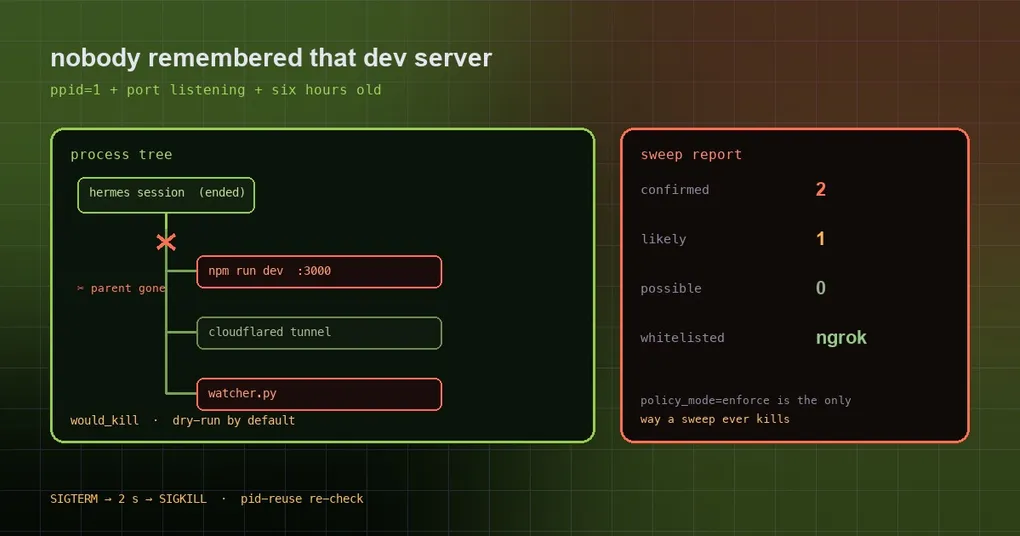
The laptop fan spins up again, localhost:3000 says the port is taken, and ps aux shows four node and python processes you do not recognize. Somewhere in the back of your mind: last week you asked the agent to “start a server and try it”, the session ended, the server did not. What these leftovers share is that nobody remembers them and nothing keeps accounts — which is the entire job of agent-janitor.
Where orphan processes come from
An agent’s tool call looks a lot like you typing in a terminal. You ask it to run npm run dev in the background, open a cloudflared tunnel, or attach a file watcher; the command returns, the process keeps running. When the session ends and its terminal goes away, Linux re-parents the survivor to PID 1 — that is what ppid == 1 means, and it is the most reliable “orphan” signature there is.
The cost is concrete: taken ports, eaten RAM, an OOM at 3am, and next time you start the agent it cannot reach its own service. Worse is the triage cost — you have no idea who started that python app.py.
It judges by evidence, not by vibes
agent-janitor grades processes instead of shooting at anything suspicious:
| Evidence | Confidence |
|---|---|
| Re-parented to init (ppid=1) and holds a port / dev-server traits / TTL exceeded | confirmed |
| Re-parented to init (ppid=1) only | likely |
| Dev traits and TTL exceeded, but the parent is still alive | possible (never auto-swept) |
Everything it reads is local: ppid and command lines from /proc, listening sockets from /proc/net/tcp{,6}, and an age threshold. Only confirmed and likely are killable.
Two classes are exempt by name: system daemons (multipathd, udisksd, ModemManager, systemd-* and friends), and host/VM management agents (tailscaled, cloud-provider agents, amazon-ssm-agent, walinuxagent, google_guest_agent). You add your own infrastructure to a whitelist:
janitor whitelist add ngrok
janitor whitelist add cloudflared
janitor whitelist add tmux
Whitelist entries are substrings matched against the command line (case-sensitive, regex-escaped, no injection). An empty array or a missing file means nothing is whitelisted.
Install, then scan before you sweep
It lives in the curated catalog (agent-janitor 0.3.1, community tier, requires Hermes >= 0.21.6). Install by name if your catalog lists it, otherwise from the repository as the README shows:
git clone https://github.com/ZidoCode/agent-janitor ~/.hermes/plugins/agent-janitor
hermes plugins enable agent-janitor
Now scan only — do not clean anything yet:
python3 ~/.hermes/plugins/agent-janitor/janitor_cli.py scan
python3 ~/.hermes/plugins/agent-janitor/janitor_cli.py sweep --ttl-h 6
That second command sounds alarming, but it is a dry run by default: decisions are printed and logged as would_kill, nothing dies.
Exactly one file unlocks real killing — <hermes-home>/plugin-data/agent-janitor/policy_mode, whose content must be precisely enforce:
echo enforce > ~/.hermes/plugin-data/agent-janitor/policy_modeThat design is worth copying: safe by default, and the risky state requires a written decision.
Before you enforce, do these five things
- Fill the whitelist first. Your tunnel, reverse proxy, tmux, anything “started by the agent but intentionally kept” goes in with
janitor whitelist add. - Read the dry-run output as the kill list. That is exactly what enforce will act on, no more and no less.
- Know who it hits. The rule is “re-parented to PID 1 for over a minute, not exempt, not whitelisted” — it does not check who started the process. A
nohup-edhermes gatewayor a tmux server is fair game in enforce mode unless you whitelisted it, and when run as root that includes other users’ processes. - Know what it leaves behind.
spawns.jsonlrecords terminal commands that looked like they start background work, andsweeps.jsonlrecords every decision (would_killor killed), so you can audit the sweep afterwards. - Know the kill order. SIGTERM, wait two seconds, SIGKILL — and before the
kill -9it re-reads the command line, aborting if the PID was recycled. No fratricide by PID reuse.
Pair it with the ledger for attribution
On its own, janitor can only say “this process is an orphan”. With the same author’s agent-ledger installed, it reads the ledger and turns an anonymous python app.py into “spawned by this exact tool call on port 8080, 12 days ago”. The attribution is fuzzy — it matches on the executable’s basename — so treat it as a hint, not proof. The author labels it the same way.
Three limits you have to know
- Linux only, because it reads
/proc. macOS and Windows are not supported, so on a Mac this tool belongs on your servers, not your laptop. - Laptop suspend inflates uptime. Uptime is boot-relative and keeps counting while the machine sleeps, so TTL false positives are possible on machines that close their lid. On a server — the main target — this does not apply.
- Whitelisting matches command-line substrings, so a whitelisted shell that then spawns something dangerous is invisible to it.
To shrink the “I don’t know what my agent did” problem generally: janitor covers the process dimension, skill fingerprinting covers the skill dimension, and cron doctor covers scheduled jobs. For the general install-and-pin routine, see the plugin catalog guide.