Running Hermes Inside NVIDIA OpenShell: the NemoClaw Sandbox Guide
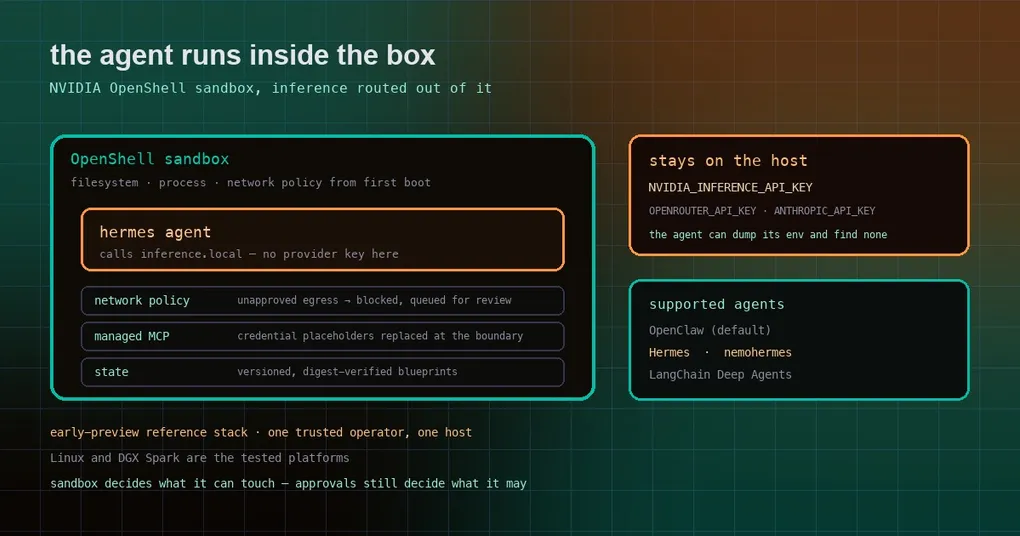
You gave an agent your terminal, your SSH keys, your home directory and the ability to install packages — and it works, right up until the moment you want to run it on a machine that matters. An always-on agent on a shared box, a workstation with production credentials nearby, or a box that a teammate also uses: now every “just run this” is a decision about blast radius. NVIDIA’s answer is to stop arguing about permissions and put the whole agent in a container with a network allow-list, then keep the API keys on the host where the agent cannot read them.
What NemoClaw is
NVIDIA NemoClaw is an open-source (Apache-2.0) reference stack for running always-on AI agents more safely inside NVIDIA OpenShell sandboxes. Its own description names three supported agents, and Hermes is one of them:
Run agents like Hermes, LangChain Deep Agents, and OpenClaw more securely inside NVIDIA OpenShell with managed inference
It is not a Hermes fork and it does not change how you use Hermes. It is the packaging around it: a host CLI (nemohermes is the NemoClaw CLI with Hermes pre-selected), a versioned container blueprint, an onboarding wizard, and an agent-specific integration layer. The repository’s own framing is worth repeating before you invest an evening in it:
NemoClaw is an early-preview reference stack for a trusted operator on one host. It is not a hosted service, a multi-tenant enterprise control plane, or an enterprise identity system.
What the sandbox actually enforces
| Capability | What it means in practice |
|---|---|
| Sandboxed execution | The agent runs in OpenShell with filesystem, process and network controls applied from first boot |
| Routed inference | The agent calls inference.local inside the sandbox; OpenShell forwards to the provider you chose. Inference credentials stay on the host |
| Operator-controlled egress | YAML network policy plus presets. Unapproved destinations are blocked and surfaced as requests for you to review |
| Managed MCP servers | Authenticated HTTPS Streamable HTTP MCP servers for the agent, with credential placeholders replaced by OpenShell at approved egress boundaries |
| Lifecycle | Versioned, digest-verified blueprints; status, logs, rebuild, recovery, snapshot and restore |
| State migration | Moving agent state between machines with credential stripping and integrity verification |
The design decision that matters most for a Hermes user is the inference path. Your provider key is never inside the sandbox. The agent talks to a local endpoint, OpenShell decides where that actually goes, and the key lives with the operator — so a prompt-injected agent that dumps its environment finds an endpoint name, not a secret.
Getting Hermes into a sandbox
On a supported host, the installer is one command, and it asks which agent you want. Express install defaults to OpenClaw, so answer n at the preset prompt to pick Hermes, a sandbox name, a provider and a model interactively:
curl -fsSL https://www.nvidia.com/nemoclaw.sh | bashFor a scripted install, set the answers up front instead of answering prompts:
export NEMOCLAW_AGENT=hermes
export NEMOCLAW_NON_INTERACTIVE=1
export NEMOCLAW_ACCEPT_THIRD_PARTY_SOFTWARE=1
export NEMOCLAW_SANDBOX_NAME=my-hermes
export NVIDIA_INFERENCE_API_KEY=<your-key>
curl -fsSL https://www.nvidia.com/nemoclaw.sh | bash
Afterwards nemohermes onboard re-enters the wizard, which is also the fastest way to see the options on your machine before committing to a config.
The provider list is broad, and one entry is Hermes-specific: alongside NVIDIA Endpoints (NEMOCLAW_PROVIDER=build), OpenRouter, OpenAI, Anthropic, Gemini, the Model Router (routed), OpenAI- and Anthropic-compatible endpoints and a ready local vLLM server, there is NEMOCLAW_PROVIDER=hermes-provider, documented as Hermes-only. Local Ollama is offered for OpenClaw and Hermes when it is installed, running, or installable.
When onboarding finishes, the wizard prints the two addresses you will actually use:
NemoHermes is ready

Sandbox:  my-hermes
Model:    nvidia/nemotron-3-super-120b-a12b (NVIDIA Endpoints)

  Hermes Agent Dashboard
  Port 18789 must be forwarded before opening this URL.
  http://127.0.0.1:18789/

  Hermes Agent OpenAI-compatible API
  Port 8642 must be forwarded before connecting.
  http://127.0.0.1:8642/v1
Both ports are forwarded from the host, not published by the sandbox — so reaching the dashboard from another machine is an explicit step, not a default.
Two Hermes-specific details worth knowing
The baseline network policy is written for Hermes, not for a generic agent. NemoClaw ships an agent-specific policy that lets the Hermes binary and its Python runtime reach the endpoints they need: Nous Research service endpoints, PyPI, NVIDIA inference endpoints, and selected messaging APIs. If you enable messaging channels, read the policy before you flip the switch — the docs point you at the messaging-channel and network-policy pages for exactly that reason.
Light terminals get a managed skin. When you connect to a Hermes sandbox from a terminal with poor contrast handling, NemoClaw may install a managed nemoclaw-light Hermes skin so the assistant text stays readable. It removes that managed state again when the terminal no longer needs it, and it preserves a skin you chose yourself.
Where the preview stops
Being clear about this saves you a bad afternoon:
- Platforms: Linux and DGX Spark are the primary tested platforms. macOS, WSL, DGX Station and headless Linux servers are documented with their own limitations rather than promised.
- Scale: one trusted operator, one host. No multi-tenancy, no enterprise identity.
- Enforcement is host-dependent. The docs say enforcement limitations vary by host; a sandbox is only as strong as the kernel features underneath it.
- It is a preview. Digest-verified blueprints and a documented lifecycle are real, but the stack is young and the docs themselves call it early-preview.
One more honest note: if your actual problem is “the agent keeps running commands I did not approve”, Hermes already has an approval gate and a deny list for that, and a sandbox is a different tool aimed at a different threat. The two compose well — the sandbox decides what the agent can touch, approvals decide what it may do.
Should you use it?
If you are running Hermes on a laptop where you watch every turn, NemoClaw is more machinery than you need. It starts to pay for itself the moment the agent runs unattended: a long-lived gateway on a workstation, a home server, or a box that other people also log into. The parts worth adopting even if you never install it are the design ideas — inference routed through a local endpoint so the key never enters the agent’s world, egress as a reviewed allow-list rather than a firewall footnote, and secrets replaced at the boundary instead of handed to the process.
The NemoClaw documentation walks through host readiness, provider choices and network policy. Closer to home: the sandbox is orthogonal to what Hermes itself does about approvals, and if you want Hermes running somewhere permanent, the gateway self-heal and loop watchdog write-ups cover the parts that keep an unattended install alive.
Sources: the NemoClaw repository README and the NVIDIA NemoClaw documentation (Hermes quickstart and overview pages); repository metadata (Apache-2.0, ~22.7k stars, actively pushed as of October 16, 2026); the Hermes baseline network policy and nemohermes CLI details are from the NemoClaw Hermes quickstart.