Every model call failing after v0.22.6? Check the SSL_CERT_FILE path first
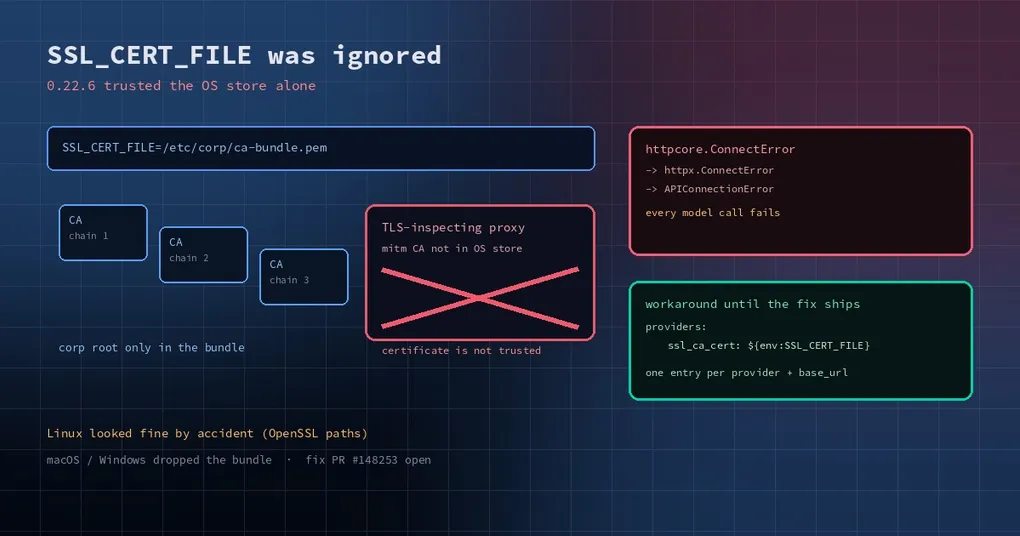
Your company network runs a proxy that opens HTTPS and inspects it. You dealt with that months ago: exported the corporate root as a bundle, export SSL_CERT_FILE=/etc/corp/ca-bundle.pem, and curl, pip and git all behave. Then you upgrade Hermes, send one message, and watch it stall — certificate is not trusted in the log, three retries, and a flat “Provider temporarily unavailable”.
Your network is not broken and your proxy settings are not wrong. Since v0.22.6, the model client resolves certificate trust through a new path, and the bundle named in SSL_CERT_FILE did not come along.
First, confirm it is this problem
The symptoms are fairly distinctive:
- Every provider fails, not just one, and switching models changes nothing.
- The error chain is
httpcore.ConnectError→httpx.ConnectError→openai.APIConnectionError: Connection error., with"[host] certificate is not trusted"in the middle. curloropenssl s_clientreaches the same host fine, because they readSSL_CERT_FILE.- Downgrading the same machine to v0.22.5 restores normal operation.
Four out of four means certificate trust resolution, not network policy.
What changed in the code
In agent/ssl_verify.py, added in v0.22.6, resolve_httpx_verify() answers “which trust should this HTTP client verify against”. The order is: verification explicitly off → an explicit ssl_ca_cert bundle → the platform store. The problem sits near that last step:
if os.environ.get("SSL_CERT_FILE") or os.environ.get("SSL_CERT_DIR"):
    return _shared_context(None)
_shared_context(None) means “the platform store alone, no extra CA bundle”. So exporting SSL_CERT_FILE pushes you into a branch that ignores it.
The module’s own docstring states the opposite contract: an exported SSL_CERT_FILE bundle is trusted on top of the platform store, and only explicit per-provider configuration (ssl_ca_cert, ssl_verify: false) replaces that trust. platform_ssl_context() in the same file implements exactly that union. The environment-variable branch and the rest of the module disagree.
Why Linux looked fine is the interesting part: truststore’s OpenSSL backend calls set_default_verify_paths(), and OpenSSL reads SSL_CERT_FILE itself, so the trust arrived by accident. macOS verifies through SecTrustSetAnchorCertificates and Windows through CryptoAPI; neither consults OpenSSL’s environment, so both fail hard. That is why the same corporate setup breaks a colleague’s Mac while your Linux box keeps working.
Three ways around it, in order of preference
1. Install the root in the OS trust store (what the docs recommend)
The security documentation is explicit: install a corporate TLS proxy’s root through your organization’s operating-system trust procedure. Once that is done, SSL_CERT_FILE stops mattering for provider calls. On macOS, mark the certificate as always trusted in Keychain Access; on Windows, import it into Trusted Root Certification Authorities via certlm.msc; on Debian/Ubuntu, drop the pem into /usr/local/share/ca-certificates/ and run update-ca-certificates. Cleanest option, survives upgrades, needs admin rights.
2. Point the provider at the bundle explicitly
If you cannot touch the system store, set the CA bundle on the provider entry:
providers:
  deepseek:
    api: https://api.deepseek.com
    key_env: DEEPSEEK_API_KEY
    ssl_ca_cert: ${env:SSL_CERT_FILE}
ssl_ca_cert replaces platform trust for that endpoint’s chat, model metadata and catalog probes. It only fixes this provider, which is usually what you want; a wrong path logs a warning and falls back to platform trust rather than failing silently.
3. Turn verification off (local development only)
ssl_verify: false makes the calls work immediately and opens you to every man-in-the-middle on the path — behind a corporate inspecting proxy, it means trusting the proxy wholesale. The docs call it unsafe for untrusted networks and warn against using it as a permanent fix for a missing root. Use it to diagnose, not to ship.
How this gets fixed
The fix PR (#148253) changes that branch to return platform_ssl_context() instead of _shared_context(None), restoring the documented union, and documents why Linux appeared to work. As of the v0.22.7 release it is still open, so the stable build you install today behaves the old way. If you are waiting on it, the check is simple: one release later, look at whether that branch in agent/ssl_verify.py returns platform_ssl_context().
One habit worth keeping
Certificate problems masquerade as “the network is down” or “the provider is having an outage”, because the surface symptom is a connection error. The next time every provider fails at once, run one layered test first: curl --cacert "$SSL_CERT_FILE" https://<host>. If that succeeds, the failure is in the application’s trust resolution, not the network — and you just skipped half an hour of packet captures.
Further reading: local models and self-signed certificates, encrypting secrets locally, what else is in the v0.22.7 window, install and upgrade.