Output that vanishes: after 1024 open files, Hermes terminal calls start coming back empty
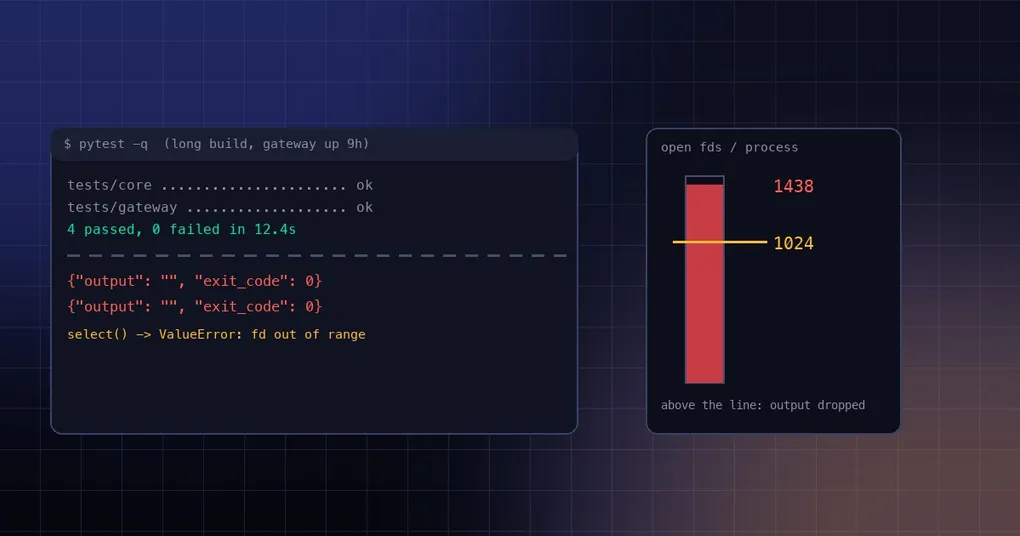
Friday afternoon: the agent says the test suite finished. You ask it to paste the output and it returns two empty quotes — {"output": "", "exit_code": 0, "error": null}. Ask it to read_file a 5 KB config and it reports file_size: 0. You cat the file yourself and it is perfectly fine. Strangely, running the same Python through execute_code reads the contents without trouble. It is as if only some channels went blind.
The model is not stonewalling you and the disk is fine. This was a bug that stayed open for nearly two months and was closed on October 21, 2026 (issue #94928, PR #142299), and the root cause is one line: once a process holds more than 1024 file descriptors, the select() call that waits for output raises an exception — and the exception was treated as “the pipe is closed”.
The symptom: empty output, successful exit code
The original report is precise. On Linux, after Hermes Desktop had been up for a while, terminal returned empty stdout for every command while reporting exit code 0. ls and stat came back empty; read_file returned file_size: 0 for a 5092-byte file; Python inside execute_code read the same path correctly.
Why empty output rather than an error? Because the reader thread gave up before it read anything: it decided the pipe was closed and discarded whatever had not arrived yet, while the command itself ran to completion and returned 0. From the caller’s side it looks like a successful call that simply had nothing to say.
The report includes the numbers that explain it: Electron main held 1438 fds, two hermes serve processes held 1429 and 1410, and a git-remote-https child held 1384. All above the line.
Root cause: the 1024 ceiling in select()
POSIX select() represents fd sets as a fixed-size bitmap whose length is FD_SETSIZE, usually compiled as 1024. Hand it a descriptor at or above 1024 and Python raises:
ValueError: filedescriptor out of range in select()Hermes reads command output in three places — the foreground drain (_drain_fd_select in tools/environments/base_output.py), the background process reader (_reader_loop in tools/process_registry.py), and the PtyBridge behind the Desktop terminal pane. All three waited in select.select(), and all three treated that ValueError as “the fd is already closed”. That is why the same dropped output appeared in foreground commands, background jobs and the desktop terminal pane alike.
You do not need Hermes to reproduce it: open 1100 handles to /dev/null, create a pipe, and call select.select() on the new descriptor. The exception arrives immediately.
The fix: replace select(), but not with poll()
The patch adds tools/environments/fd_wait.py, a small FdWaiter built on selectors.DefaultSelector — epoll on Linux, kqueue on macOS, neither of which has an FD_SETSIZE ceiling.
class FdWaiter:
    """Readability wait on one fd. Owns a selector (epoll/kqueue are fds themselves):
    create it once per reader lifetime and close() it when the reader is done."""

    def __init__(self, fd: int, selector_cls):
        self._selector = selector_cls()
        try:
            self._selector.register(fd, selectors.EVENT_READ)
        except BaseException:
            self._selector.close()
            raise

    def wait(self, timeout_s: float) -> bool:
        return bool(self._selector.select(max(timeout_s, 0)))
One counterintuitive choice: poll() has no 1024 limit either, so why not use it? Because macOS poll() does not support device fds — it reports a PTY master as POLLNVAL, meaning “ready right now”. A PTY read loop built on poll() would spin at full speed whenever it was idle, burning a core. So poll() survives only as a fallback where nothing else is possible: unlike epoll and kqueue it does not need an fd of its own, so it still works under EMFILE; on macOS, for a character device (PTY), the code raises rather than accept a wait that never waits.
The patch also closes two edges: a selector setup failure must never be reported as EOF, and each reader owns one waiter for its lifetime and closes it when done, so fixing the old leak does not introduce a new one.
How to tell whether you were hit
A symptom table beats log spelunking: the command really ran (side effects present), but output is an empty string, exit_code is 0, and error is null; read_file reports 0 bytes for a non-empty file; execute_code reads the same file fine. All three together, and you can stop guessing.
Counting descriptors confirms it. On Linux:
for p in $(pgrep -f "hermes_cli.main serve"); do
  echo "$p: $(ls /proc/$p/fd | wc -l) fds"
done
On macOS:
lsof -p $(pgrep -f "hermes_cli.main serve" | head -1) | wc -lulimit -n is only context — macOS often starts at 256, Linux at 1024 — because the line that matters is FD_SETSIZE, not the shell limit.
On an older build the stopgap is blunt: restart the gateway (and Desktop), push the fd count back down, and output returns immediately. And never read “empty output with exit 0” as “the command printed nothing”; a plausible-looking empty result is the easiest thing to write into a conclusion.
Long-lived services accumulate descriptors no matter what you run inside them, so this is not about containers or about the shared Docker container setup — it is about process uptime and connection count. For adjacent operational ground, see orphan process reclamation and the terminal temp directory guide; gateway commands live in the hermes gateway reference.
Can you use it today?
The patch merged into main on October 21, 2026 and is not in a release yet (the latest published version, v0.22.2, predates it). It will ship with the next patch. To see it work now, hold around 1100 descriptors in a process and run echo: on the old code the output is gone, on the new code it comes back.
The short version
Three things to remember. Empty output with exit 0 means dropped output, not empty output. The cause is select()’s 1024-descriptor ceiling, not memory, disk or permissions. The fix uses a selector with no ceiling and deliberately avoids macOS poll(), which would spin. When an illness only affects long-running instances, count file descriptors before you read logs.