Task lists can nest now: Hermes todo grows subtasks
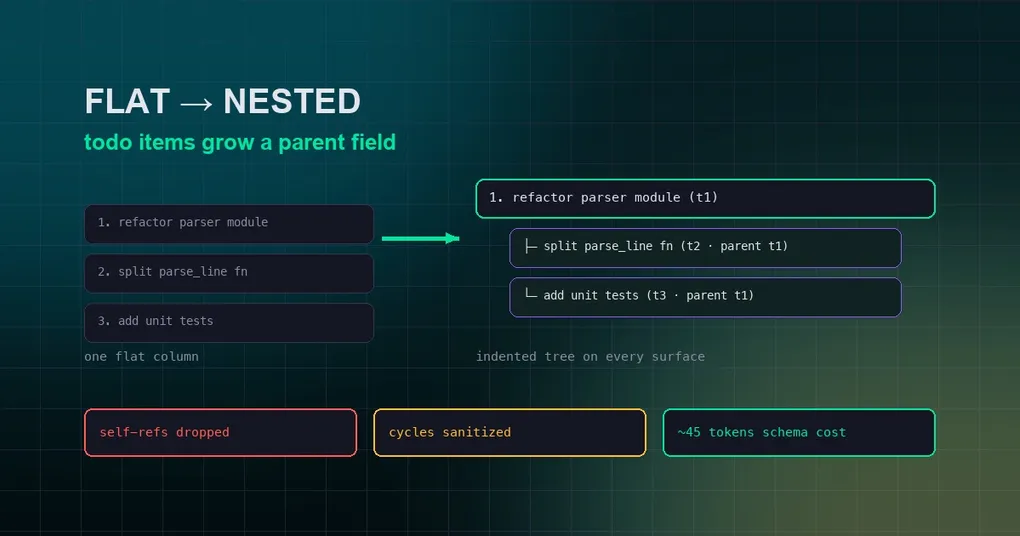
Have you noticed that when you ask Hermes to do something genuinely complex — “refactor this module and add tests” — it keeps a todo list in the session, ticking items off as it goes, and still remembers where it was even after context compression? That list used to have a hard ceiling: it was flat. Every task sat in a single column, and order meant priority. Expressing “first do A, then inside A there are steps 1, 2, 3” took awkward prose, was harder for the agent to read, and harder for you to scan. PR #97921 (merged August 29) removes that ceiling: todo items can now nest — subtasks hang off a parent via an optional parent field, and every surface renders the tree with indentation.
What the todo tool is
First, the background. todo is a built-in Hermes tool: the agent automatically uses it to build a tracking list for complex tasks (the official tool docs suggest 3+ steps) or when you hand it several things at once. Its design is deliberately restrained:
- One single
todotool — pass atodosparameter to write, omit it to read the current list; - Every call returns the full current list, so the agent always knows where it is;
- Four statuses only:
pending,in_progress,completed,cancelled; - After context compression, the list is re-injected with a stable header (“[Your active task list was preserved across context compression]”), so long tasks don’t lose memory.
The agent maintains the list itself — you don’t need to remember any command. Just ask it to “make a plan first” or “break this down into a task list” in your prompt and it takes it from there.
What subtasks look like
The change is one thing: each todo item gains an optional parent field pointing at another item’s id.
1. Refactor parser module         (id: t1)
   ├─ Split parse_line function   (id: t2, parent: t1)
   └─ Add unit tests              (id: t3, parent: t1)
2. Update docs                    (id: t4)
The effect: every surface — CLI text, the desktop app’s task panel, the ACP adapter — renders subtrees indented. The official tool reference puts it plainly: an item’s optional parent field points at another item’s id, making it a subtask, and surfaces render the tree indented.
The implementation also defends against the agent tying itself in knots:
- Self-references are dropped — a
parentpointing at itself is ignored; - Dangling and cyclic references are sanitized — a
parentthat doesn’t exist, or an A→B→A loop, gets cleaned up after writing; - A completed parent stays visible while any descendant is active — after compression re-injection, a parent whose children are still in progress isn’t hidden;
- Reordering skips nested lists — moving a flat position would tear a subtask away from its siblings, so the tree stays intact;
- The ACP adapter indents to a maximum of 4 levels — so the tree never becomes unreadable.
The cost control is worth noting too: the entire feature adds one string property and one behavior sentence to the cached tool schema — about 45 tokens. No new tool, no new parameters besides parent, no system-prompt changes.
How to use it: plain language is enough
You never touch JSON — todo is the agent’s tool, and you only need to express the “I want layers” intent:
"Break this release down into a task list: code freeze first, then tests, build, and packaging as subtasks under it"The agent does the rest, producing a nested list with parent links; you can ask “where are we now?” at any time and it reads the list to tell you. For structures that naturally run in parallel — like “research phase” with “compare option A” and “compare option B” hanging under it — nesting reads far clearer than a flat list.
When it helps most
- Multi-stage tasks: releases, migrations, refactors — naturally hierarchical (“big phase → small steps”), and nesting makes progress visible at a glance.
- Long sessions: after compression the tree re-injects intact, so the agent never confuses subtasks with parents.
- Multiple surfaces: the desktop app’s task panel renders a true tree, and gateway messages show the indented structure too.
This change landed August 29 (PR #97921) and is currently on main only — no release tag includes it yet (v0.20.6 was tagged August 27). To try it now, hermes update to the latest code.
Summary
Going from a flat list to a nestable task tree is one small field, but it genuinely upgrades the long-task experience: structure is right, the agent’s progress tracking and your reading both get easier — all for 45 tokens. Next time you hand Hermes something complex, tell it to “break the task down into a list with subtasks” and watch the difference.
For more long-task mechanics (turn limits, run budgets, interrupting without stopping), see our unlimited-turns guide and context token optimization guide.