Hermes v0.22.0: a first launch that sets itself up, connectors inside your apps, and one-click local models
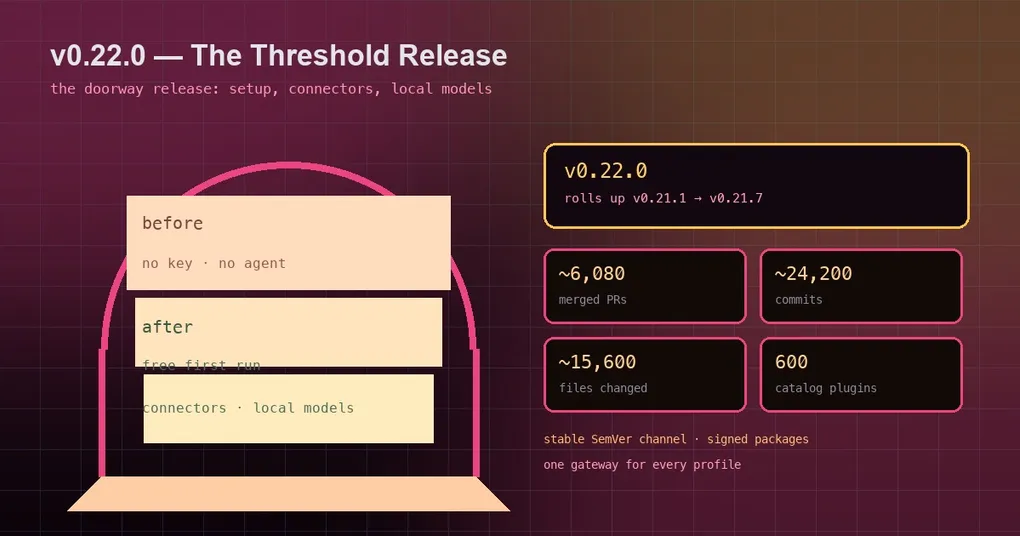
You hand Hermes to a teammate. They install the desktop app, open it, and ask the obvious question: “so what do I click first?” Before they can say hello, they need an account, an API key, a settings page, and a model to pick. The other version of that scene is you on a new machine, twenty minutes into configuration, giving up for the night. v0.22.0 (tag v0.22.0, released October 13, 2026) goes after that whole threshold — everything between “just installed it” and “it did something useful.”
It is also the biggest window this project has shipped: roughly 24,200 commits, ~6,080 merged PRs and ~15,600 files changed since v0.21.0, with about 2,520 contributors and ~7,180 issues closed — some 2.5x the previous cycle, and it rolls up and documents the v0.21.1–v0.21.7 patch releases. Here is what actually changes how you use it.
The first launch is a conversation
Open the desktop app on a computer where Hermes has never run and you get a short guided setup chat instead of a settings screen. One card at a time it asks your name, an accent color and a layout, which apps to connect, and which plugins to install; then it gives a quick tour and lines up as many as four first tasks for you. It runs on a free trial model, nous/welcome (once per OS user), so no API key is needed: a newcomer is talking to the agent before they have paid for anything. Skip setup ends it, and Settings → Run onboarding again brings it back. The agent also picked up a set_theme tool, so “make it violet, dark mode” genuinely works in any desktop chat. It only appears on fresh installs — remote backends (SSH, URL, Cloud) do not get it automatically (the onboarding walkthrough).
Connectors put the agent inside your apps
An agent that can only act inside its own chat window means you are the integration: you copy the ticket into the conversation and paste the answer back. Through the Nous tool gateway, Hermes can now act in hosted apps such as Linear and Notion — name the app you want, sign in once in your browser, and its tools are usable in the same turn. You do not need a Nous account to start: the first time you use an app, Hermes creates a free connectors-only identity. The desktop gained a Connectors page that lists hosted apps and your MCP servers together (it replaces the MCP tab), the TUI and CLI show the same setup card, and you can connect several named accounts of one app — say a work and a home account.
Local models without the yak shaving
If your reason for wanting a local model is that nothing should leave the machine, this release removes most of the work. Hermes installs and maintains llama.cpp with the right engine for your hardware (CPU, CUDA, Metal, Vulkan or ROCm), rates each catalog model against your GPU and RAM, and picks the best build that actually fits. Downloads pause and resume, the server starts and stops with Hermes, and engine updates are one click. Start from Settings → Providers → Local Models, or hermes model → Local models. The catalog includes Qwen3.8 27B, Qwen3.8 Flash Next with its MTP speculative head, Qwen3.6 35B-A3B and DeepSeek V4 Flash, plus any GGUF from Hugging Face. Recommendations also got stricter: only models that fit fully in GPU memory are suggested now.
Updates follow tested releases, and hermes pm owns the toolchain
A source install used to track every commit on main. It now follows tested SemVer stable releases: every release passes source CI, Docker, Nix, signed desktop builds and install/upgrade runs on every OS before it is published. Prefer the bleeding edge? hermes update --set-channel main, or the channel switch in Settings → About. Moving to an older release is labelled a rollback and never happens without asking.
Underneath, a unified package manager (hermes pm) owns every pinned, hash-checked tool and Python environment, with hermes pm doctor|status|repair|gc. It fixes a specific old failure mode: updates build a new environment and switch only once it passes its check, so a failed or killed update cannot leave you half-applied — a killed update repairs itself on the next launch. Dependency environments are generations, and old ones are reclaimable: 92 GB down to 18 GB on one host.
Signed packages, and the Microsoft Store
The desktop app is now a sealed, signed package carrying its own Python and Node, updating itself, so first launch builds nothing. Windows gets a signed MSIX (x64 and ARM64) through App Installer or the Microsoft Store; macOS gets a signed, notarized Apple Silicon build. Two edges worth knowing: the Windows desktop is MSIX-only and needs Windows 11 22H2 or newer, and macOS default builds are Apple Silicon only. If you have been holding off because your install was a pile of unpackaged dependencies, this is the version to re-install from.
The model wave, and reasoning that survives
Claude Fable 5.1, Opus 5.5, Sonnet 5.5 and Haiku 5.5, GPT-6 Astra / Sol / Luna plus GPT-6.1 Sol, and Gemini 4 Argon are all pickable on Nous Portal, OpenRouter and native routes where offered. The more practical change is that prior reasoning is replayed by default on every provider that can read it, across resume, branches and compaction, so a long multi-step task keeps its train of thought instead of re-deriving it. And when a provider has a bad hour, Hermes waits out transient 503/529/timeouts in visible, bounded cycles rather than ending your turn.
The picker learned about your plans too: star favorites, see a subscription running low (“17% left · resets 3:00 PM”) and when a rate limit lifts, and choose reasoning effort as part of picking a model (/model X --reasoning high).
The rest of the spine
- Log into sites with your password manager — 1Password, Bitwarden or Hermes’s own encrypted vault fill logins without the password ever entering the model’s context; one-time codes are filled automatically, and card fills at checkout wait for your confirmation (the login walkthrough).
- Bot Screen — a bot on a Linux gateway can have its own desktop, streamed live to Hermes Desktop; when it hits a login, 2FA or a CAPTCHA you take the screen, finish the step, and hand control back.
- One gateway and one backend for every profile — instead of one process per profile, a machine runs one messaging gateway and one desktop backend serving them all; new profiles’ bots go live without a restart and keep their own credentials, allowlists, cron jobs and sessions.
- Subagents you can steer live — CLI (F6), TUI (Ctrl+T) and Desktop show each child’s task, elapsed time and live transcript above the composer, with Steer and Stop;
/stopreaches background children and hands back partial work. - One translation catalog — CLI, gateway, TUI and Desktop strings share it, new languages ship as plugins, and any profile can override individual strings with a small YAML file (the language packs guide).
- A codebase a third smaller — 1.06M lines to 698K (−34%), and
gateway/run.pyfrom 34,847 lines to 5,512; about 19 rarely used tools now load only when the agent searches for them, roughly halving the desktop tool schema sent on every call. - A 600-plugin catalog — every entry pinned to a reviewed commit, browsable by category and stars, with a page per plugin and per author; memory providers moved out of core to their makers and migrate automatically.
Three things to know before you upgrade
First, chats no longer reset on an idle or daily timer: the session_reset idle/daily modes are retired, and only /new or /reset starts fresh. Second, old sessions are pruned automatically: sessions.auto_prune defaults to on, deleting ended sessions inactive for 90 days at startup — pinned and open sessions are never touched, and sessions.auto_prune: false keeps everything. Third, for plugin authors: the old compatibility import layer, hermes sync and the bundled tirith scanner are gone, and todo, cronjob and process became todo_list, cronjob_manage and process_manage (the old names still work).
Upgrading
hermes updateManaged installs get a Python 3.14 runtime (KittenTTS is unavailable on 3.14). After upgrading, run hermes doctor to verify the install and restart the gateway (hermes gateway) so platform changes take effect. To see what the next update will touch before running it, use hermes update --plan; the full grouped changelog is on this release’s page.