The stream keeps trickling and never finishes: an opt-in total lifetime cap for one response
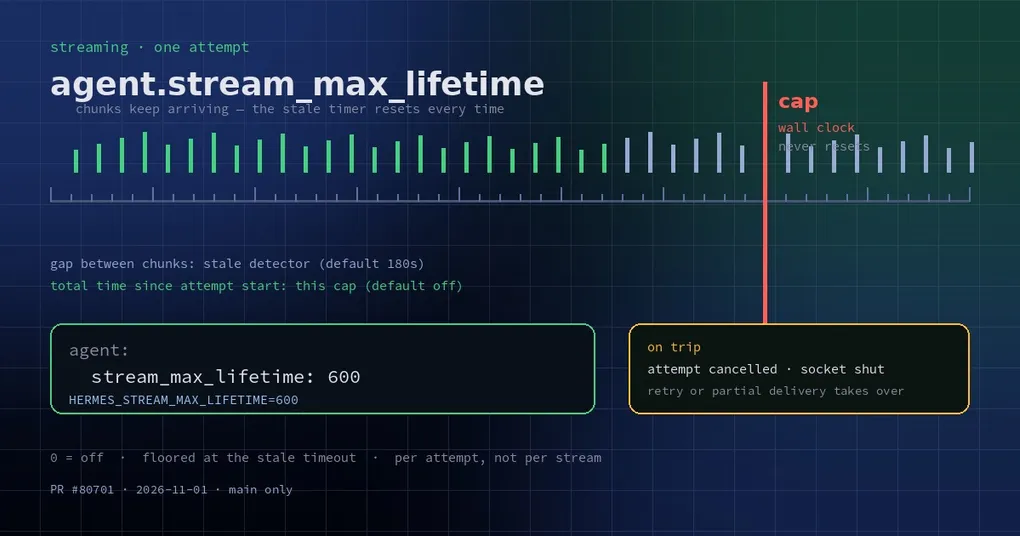
It is 10 p.m. You send a request and text starts appearing. A word at a time, diligently, and it never ends. Twenty minutes later the cursor is still blinking and the spinner is still moving — you do not dare press Ctrl-C (you would lose what has already been generated), and you have no way to tell whether it is computing or just spinning in place.
That “always almost done” hang is worse than a clean failure. A clean failure at least has a watchdog: if no data arrives for long enough, the connection is declared dead and retried. But this stream dribbles out a little something every few seconds, so the watchdog is fed every time and never fires.
Two ways a stream can hang, and only one was covered
Hermes has timeout layers for streaming. Two matter here:
- Socket read timeout (default 120s): how long without any bytes before the connection is considered broken.
- Stale stream detection (default 180s): how long without a new chunk before the stream is declared stuck and killed for a reconnect.
The important part is the second one’s definition: it measures the gap between chunks, and it resets on every chunk. That design is deliberate — a model thinking hard may legitimately go quiet for dozens of seconds, and killing it for silence would be wrong. But it leaves a blind spot:
| Failure mode | What it looks like | Did the old logic catch it |
|---|---|---|
| Total silence | No chunks at all | Yes — stale detection kills it after 180s |
| Trickling but never ending | A little data every few seconds, no finish | No — every chunk resets the clock |
The second mode happens in the real world: a relay gateway chopping the response into tiny pieces, an upstream that falls into some loop mid-generation, a proxy layer that keeps sending keep-alive heartbeats without advancing the content. Your turn sits there, holding the session and the token budget, delivering nothing.
The new knob: a cap on one attempt
The newly merged change adds an opt-in setting: agent.stream_max_lifetime, or the environment variable HERMES_STREAM_MAX_LIFETIME. It measures wall-clock time since the current streaming attempt started, and it never resets when a chunk arrives.
agent:
  stream_max_lifetime: 600   # seconds; 0 = off (default)
Or per-process:
HERMES_STREAM_MAX_LIFETIME=600 hermes gatewayThe default is 0, meaning off, and that default is intentional: a long-reasoning model that legitimately streams for tens of minutes must not be cut by a one-size-fits-all number.
The behavior details are worth knowing, because they decide whether it fires when you want:
- Charged per attempt: each retry is a fresh attempt with a full budget; the previous attempt’s time is not carried over.
- Floored at the stale timeout: the cap is raised to the effective stale-stream timeout, so it can never fire before the detector that is already waiting would have, and cannot cut a stream that is merely quiet.
- Killed like a stale stream: the attempt is cancelled, the request-local client aborted, its socket shut down, and the cross-turn stale breaker counts it once.
- Recovery still happens: the retry loop reconnects, or partial delivery continues from what was already generated — the text you already read is not thrown away.
When it does fire, the error names the setting instead of blaming the endpoint vaguely:
Response still streaming after 612s, cut by agent.stream_max_lifetime (600s).
Raise agent.stream_max_lifetime, or set it to 0 to turn the cap off,
if this model legitimately streams this long.
How it sits among the other timeout layers
Streaming timeouts in Hermes are layered. Do not collapse them into one number:
| Layer | Default | What it does | Where to set it |
|---|---|---|---|
| Socket read timeout | 120s | No bytes at all means a broken connection | HERMES_STREAM_READ_TIMEOUT |
| Stale stream detection | 180s | Too long between chunks means a stuck stream | HERMES_STREAM_STALE_TIMEOUT |
| Stream max lifetime | Off (0) | Total wall-clock cap per attempt | agent.stream_max_lifetime / HERMES_STREAM_MAX_LIFETIME |
| Reconnect attempts | 3 | How many times to reconnect mid-stream | HERMES_STREAM_RETRIES |
| Stale circuit breaker | 5 consecutive | After repeated kills with no completed reply, fail fast instead of re-waiting | HERMES_STREAM_STALE_GIVEUP |
The mental model: read timeout covers “nothing at all”, stale detection covers “quiet for too long”, max lifetime covers “always moving, never finishing”, and the breaker covers “this keeps failing, stop waiting”.
What value to pick
- Long local reasoning or huge prefills: leave it at
0. Those streams are slow but legitimate, and a hard cap will cut real work. - Gateway and bot setups: relay quality is out of your control, so set a value past which more waiting has no value — 300 to 900 seconds is a reasonable range. Past that, one reconnect is usually worth more than more patience.
- Unattended automation (cron, batch jobs): set an explicit cap rather than reconstructing from logs why a turn hung for three hours.
- Do not set it below the stale timeout: it gets floored up to the stale timeout anyway, so a smaller number is a no-op. To be more aggressive, lower
HERMES_STREAM_STALE_TIMEOUTas well.
One known boundary: the Bedrock polling stream (the chat_completion_helpers.py path) is not covered — that file is not allowed to grow. On Bedrock, this layer does not apply yet.
There is also a safety net worth knowing: if the same attempt is killed three times and still does not unwind (a worker stuck where cancellation cannot reach it), the monitor abandons the worker and reports the request as abandoned instead of re-killing it every window and stalling the whole turn forever.
Status and related reading
The cap merged on 2026-11-01 (PR #80701) and shipped in v0.22.6 (2026-11-02) — an upgrade gets it; v0.22.5 and older do not have it.
One clarification: it fixes “never finishes”, not “already-read text gets discarded”. That second class is a delivery-layer problem, covered in the streaming delivery round-up. If your stall happens on a local model server — the server itself wedged rather than the stream trickling — start with a local model server going offline. For the broader timeout picture, see the config command reference and the gateway loop watchdog.