Move code execution off your laptop: persistent sandboxes and parallel batches with Hermes + Flame
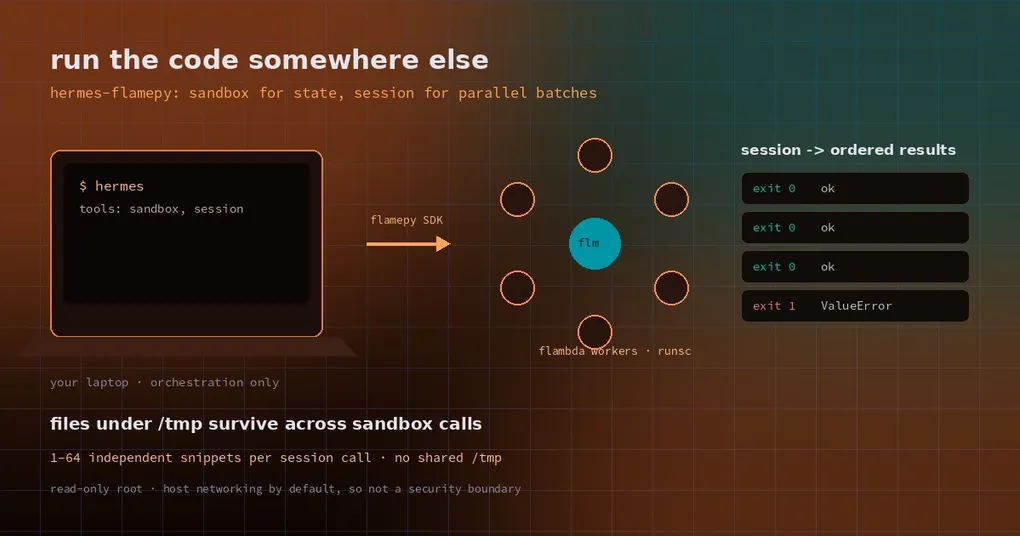
You ask the agent to process a 200 MB log: clean it, aggregate it, chart it. Each step is fast enough — until you want to rerun three parameter combinations on a 16 GB laptop. The fans spin up, you watch memory nervously, and every candidate re-imports pandas from scratch. Or you want eight hypotheses checked at once, and the agent runs them one at a time because that is all a local shell can do.
Remote execution clusters solve this, but wiring an agent to one usually means writing glue. The community plugin hermes-flamepy takes a different route: it adds two tools to Hermes that submit code snippets to a Flame cluster, leaving your machine to orchestrate and read results.
Three walls you hit running code locally
Context budget. If every step pushes data and intermediate results back through the model’s context window, a few rounds and it is full. The right shape is to leave files in the execution environment and hand the model only summaries — but local execution is one process per call, so state is easy to lose.
Compute. Your parallelism is your core count. Parameter sweeps spend more time queueing than computing.
A dirty environment. Months of pip install experiments on the host and nobody remembers which package belonged to which run.
A remote sandbox attacks all three at once: files stay remote, parallelism comes from the cluster, and the environment is a throwaway image.
Two tools, one dependency rule
The plugin exposes exactly two tools, and the choice between them is one question: does the next step need the previous step’s files?
| Tool | Input | Execution | Use it for |
|---|---|---|---|
sandbox |
one code string |
sequential calls in one persistent sandbox; files under /tmp survive between calls |
dependent multi-step work: clean → aggregate → chart |
session |
codes list of 1–64 snippets |
each snippet on its own executor, run concurrently, no shared /tmp |
independent candidates: sweeps, side-by-side comparisons |
Both take language (python or shell, default python) and an optional timeout in seconds.
The rule is correctness, not style. Snippets in a session can land on different workers, so “write a file here, read it in the next snippet” fails at random. Conversely, stuffing independent work into sandbox throws away the parallelism you paid for.
Installing it
hermes plugins install xflops/hermes-flamepy
hermes plugins enable hermes-flamepy
hermes tools enable flamepy
Two prerequisites, both mandatory:
- a Flame cluster with the
flmboxapplication registered andrunsc(gVisor) on the executors; flamepy0.7.0 or later installed in the Hermes environment, configured to reach that cluster.
The plugin does no scheduling itself — it translates tool calls into Flame SDK calls; queueing, worker assignment and image pulls belong to the cluster. Which means its reliability ceiling is your Flame deployment, not the plugin.
Scenario one: several steps sharing files
First call: sandbox with shell to create the input.
mkdir -p /tmp/demo
printf 'region,revenue,cost\neast,120,75\nwest,80,55\n' > /tmp/demo/sales.csv
Second call: still sandbox, this time Python that reads it and writes a summary.
import csv, json
from pathlib import Path

work = Path("/tmp/demo")
rows = list(csv.DictReader((work / "sales.csv").open()))
revenue = sum(int(r["revenue"]) for r in rows)
profit = revenue - sum(int(r["cost"]) for r in rows)
summary = {"rows": len(rows), "revenue": revenue, "profit": profit}
(work / "summary.json").write_text(json.dumps(summary))
print(json.dumps(summary))
Third call reads it back to prove the file survived. What does not survive is Python variables or shell settings — only the filesystem. A sandbox gives you the same machine, not the same interpreter.
That read-only root filesystem is why the plugin sets PIP_TARGET and PYTHONPATH to /tmp/site-packages: only /tmp is writable, so a plain pip install still works and later calls can import the package. The image ships without uv, so PEP 723 inline dependency metadata is not available.
Scenario two: four candidates in one call
Compare three discount policies plus one invalid input. Each program is independent, so all four go into one session call:
import json

revenues = [120, 80, 150, 100]
costs = [75, 55, 90, 70]
discount = 0.1          # other snippets use 0.0 / 0.2 / 1.2

if not 0 <= discount <= 1:
    raise ValueError("discount must be between 0 and 1")

revenue = round(sum(revenues) * (1 - discount), 2)
print(json.dumps({"discount": discount, "revenue": revenue,
                  "profit": round(revenue - sum(costs), 2)}))
The result is an array in submission order, one object per snippet:
[
  {"exit_code": 0, "stdout": "{\"discount\": 0.0, \"revenue\": 450.0, ...}\n", "stderr": ""},
  {"exit_code": 0, "stdout": "{\"discount\": 0.1, \"revenue\": 405.0, ...}\n", "stderr": ""},
  {"exit_code": 0, "stdout": "{\"discount\": 0.2, \"revenue\": 360.0, ...}\n", "stderr": ""},
  {"exit_code": 1, "stdout": "", "stderr": "ValueError: discount must be between 0 and 1\n"}
]
Note the last entry: one failing snippet does not fail the others. A non-zero exit_code means that program failed. If a snippet could not run at all (infrastructure or SDK error), exit_code is -1 and the error is in stderr. That distinction matters in batch validation: the first is your answer, the second is an environment problem.
Reading results without fooling yourself
- Check
exit_codebefore the output.0is success,1is usually program logic,-1means call the cluster operator, not the debugger. - Trust the ordering. Completion order is nondeterministic; the result array is always in input order, so candidate 3 is always element 3.
- Make side effects idempotent. On a stale session the plugin retries submission once; if the first submission had partly succeeded, earlier snippets may run again. Writes and outbound calls should tolerate a replay.
Six boundaries worth knowing
- The sandbox is not network-isolated. The built-in
flmboxapplication starts with--network=host, so code can reach anything the worker reaches, internal services included. Isolation is a cluster configuration change, not a default. - The root filesystem is read-only. Only
/tmpis writable; export anything you need before the session ends. - Neither sandbox nor session closes itself. Ids are derived from the machine’s MAC address (
hermes-sandbox-<mac>,hermes-session-<mac>), so they persist across Hermes restarts — and the plugin never closes them. Clean up on the cluster side withflmctl list -s,flmctl close -s <id>,flmctl delete -s <id>. Swapping a network adapter or docking a laptop changes the MAC, which changes the sandbox and loses the old files. - A closed sandbox shifts to a new id. Reusing a closed id opens
...-1,...-2and the previous files are gone. - Clear proxy variables on the right process. SDK calls inherit the environment of the process that executes them. With a persistent gateway, editing the proxy in your CLI does not touch the environment the gateway already inherited.
- There is no tenant isolation. This is a tool for your own cluster, not a multi-tenant service.
When not to use it
- Tiny one-shot calculations. Local
execute_codeis less ceremony than an RPC round trip. - GPU work. The published measurements are all CPU workers; there is no GPU path.
- Untrusted code that needs real isolation. Host networking by default makes that a bad idea.
- You have one machine and no cluster. What you actually want is a local container backend — see the docker sandbox write-up or the options in the terminal backend plugins guide.
How to read the performance numbers
The author measured inside their own cluster, with their own image — treat these as reference points, not promises: sandbox first allocation median 148 ms with a new executor and service, 79 ms with a retained one; warm calls around 26 ms for Python and 8 ms for shell, and about 24 ms / 8 ms for a single-worker session. There is no parallel speedup figure — the write-up explicitly says throughput was not measured, so do not quote these as “faster than local”. The value of remote execution is capacity and isolation, not per-call latency.
Status
hermes-flamepy is at 0.2.0 and is not in the official catalog, so it installs from Git with the three commands above. It moves execution to the cluster but leaves the judgement — what can run in parallel, what must be sequential — with you and the model. That is the same division of labour as pluggable delegation backends: the tool ships the work out, the orchestration stays your job.